Quick Verdict: Which Platform Should You Choose?
Choosing the right automation platform can save you thousands of dollars per year and hundreds of hours of manual work. But with n8n, Zapier, and Make all competing for your attention, the decision is far from straightforward. Each platform has carved out its own niche, and the best choice depends entirely on your technical skills, budget, and workflow complexity.
Here is the short version before we dive deep:
- Choose Zapier if you want the easiest setup, the largest app ecosystem (8,000+ integrations), and you do not mind paying a premium for convenience.
- Choose Make if you want powerful visual workflows at roughly one-third the cost of Zapier, with strong AI capabilities and no coding required.
- Choose n8n if you are a developer or technical team that wants full control, self-hosting options, open-source flexibility, and the lowest cost at scale.
Now let us break down exactly why, with real pricing numbers, feature comparisons, and use-case recommendations based on the latest 2026 data. This comprehensive guide from the AI Tools Hub covers everything you need to make an informed decision.
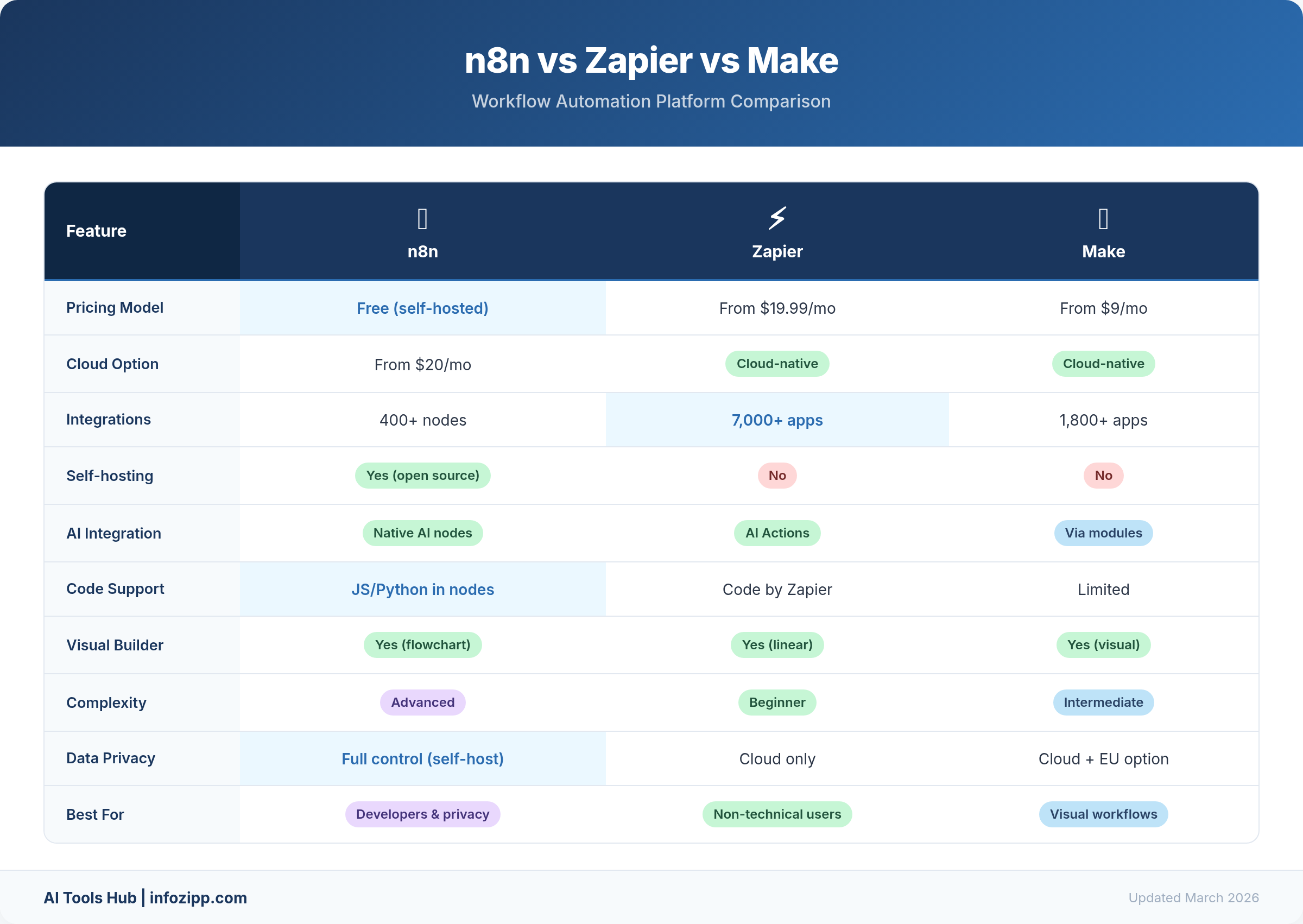
Quick Comparison Table
| Feature | n8n | Zapier | Make |
|---|---|---|---|
| Type | Open-source, self-hostable | Cloud-only SaaS | Cloud-only SaaS |
| Integrations | 400+ core + 600+ community | 8,000+ | 2,400+ |
| Free Tier | Unlimited (self-hosted) | 100 tasks/month | 1,000 operations/month |
| Paid Starting Price | €24/month (cloud) | $19.99/month (annual) | $9/month |
| Billing Model | Per execution (whole workflow) | Per task (each step counts) | Per operation (per step) |
| AI Features | 70+ AI nodes, LangChain | Copilot, AI Agents, MCP | AI Agents, AI Toolkit, MCP |
| Self-Hosting | Yes (free) | No | No |
| Best For | Developers, technical teams | Non-technical users, SMBs | Power users, agencies |
| Learning Curve | Steep | Very easy | Moderate |
n8n Deep Dive: The Open-Source Powerhouse
What Is n8n?
n8n (pronounced “nodemation”) is an open-source workflow automation platform that has rapidly gained traction among developers and technical teams. Unlike Zapier and Make, n8n can be self-hosted on your own infrastructure, giving you complete control over your data and unlimited workflow executions at zero software cost.
Founded in 2019 and backed by significant venture funding, n8n has grown to over 400 core integration nodes with an additional 600+ community-contributed nodes. Its GitHub repository has accumulated tens of thousands of stars, making it one of the most popular open-source automation projects in the world.
Key Features
- Open-source and self-hostable: Run n8n on your own servers with Docker, Kubernetes, or any cloud provider. The Community Edition is completely free with unlimited executions.
- Execution-based pricing: Unlike Zapier and Make where each step in a workflow counts separately, n8n charges per execution of the entire workflow. A 20-step workflow costs the same as a 2-step workflow.
- Code-friendly: Write custom JavaScript or Python within workflows. Add custom nodes. Access raw HTTP requests and webhooks with full flexibility.
- AI-native capabilities: n8n offers 70+ AI nodes with built-in LangChain integration, support for self-hosted LLMs, and the ability to build complex AI agent workflows directly within the platform.
- Unlimited workflows: As of 2026, n8n has removed all active workflow limits across every plan, including the free self-hosted edition.
n8n Pricing (2026)
| Plan | Price | Executions | Key Features |
|---|---|---|---|
| Community (Self-Hosted) | Free | Unlimited | Full platform, unlimited users, community support |
| Starter (Cloud) | €24/month | 2,500 | Unlimited workflows, unlimited users, cloud-hosted |
| Pro (Cloud) | €60/month | 10,000 | Everything in Starter + advanced features |
| Enterprise (Cloud) | €800/month | 40,000 | SSO, Git integration, multi-environment, priority support |
| Startup Program | $400/month | Unlimited | For companies with <20 employees, <$5M funding |
Who n8n Is Best For
n8n is ideal for developers, DevOps teams, data engineers, and any technical team that values control, customization, and cost efficiency. If you are comfortable with Docker and server management, you can run n8n for virtually nothing while building automations that would cost hundreds per month on competing platforms.
Zapier Deep Dive: The Ease-of-Use Champion
What Is Zapier?
Zapier is the most widely used workflow automation platform in the world, and for good reason. With over 8,000 integrations, an incredibly intuitive interface, and an AI-powered Copilot that can build automations from plain English descriptions, Zapier has made automation accessible to anyone regardless of technical skill.
Founded in 2011, Zapier pioneered the concept of connecting web apps through simple trigger-action workflows called “Zaps.” Over the years, it has evolved well beyond simple two-step automations to support multi-step workflows, conditional logic, and now AI agents.
Key Features
- 8,000+ integrations: The largest app ecosystem of any automation platform by a wide margin. If an app exists, Zapier probably connects to it.
- AI Copilot: Describe what you want to automate in plain English, and Zapier builds the workflow for you. This dramatically reduces setup time for new automations.
- AI Agents and Chatbots: Build autonomous AI agents that can take actions across your connected apps. Chatbots can be deployed to handle customer interactions.
- Zapier Tables and Interfaces: Built-in database and form builder that turns automations into lightweight apps, eliminating the need for separate tools.
- Zapier MCP: Model Context Protocol support that allows AI assistants to trigger Zapier workflows, bridging the gap between conversational AI and task automation.
- 99.9% uptime SLA: Enterprise-grade reliability with the strongest uptime guarantees among the three platforms.
Zapier Pricing (2026)
| Plan | Price (Annual) | Tasks/Month | Key Features |
|---|---|---|---|
| Free | $0 | 100 | 5 Zaps, two-step workflows only, Tables, Forms, MCP |
| Professional | $19.99/month | 750 | Unlimited Zaps, multi-step workflows, webhooks, filters |
| Team | $69/month | 2,000 | 25 users, shared Zaps, SAML SSO, Premier Support |
| Enterprise | Custom | Custom | Unlimited users, advanced admin, audit logs, dedicated support |
Important pricing note: Zapier counts each step in a workflow as a separate task. A 5-step Zap that runs once uses 5 tasks, not 1. This makes Zapier significantly more expensive for complex, multi-step workflows compared to n8n and Make.
Who Zapier Is Best For
Zapier is perfect for non-technical users, small business owners, marketing teams, and anyone who needs to set up automations quickly without a steep learning curve. If your workflows are relatively simple (2-5 steps) and you value having access to every SaaS app under the sun, Zapier is hard to beat.
Make Deep Dive: The Visual Workflow Master
What Is Make?
Make (formerly Integromat) is a visual automation platform that occupies the sweet spot between Zapier’s simplicity and n8n’s technical power. Its canvas-based workflow builder lets you create complex branching logic, loops, and error-handling routines using a drag-and-drop interface that feels more like drawing a flowchart than programming.
Acquired by Celonis in 2020, Make has continued to grow its integration library to over 2,400 apps while maintaining pricing that undercuts Zapier by roughly two-thirds at comparable usage levels.
Key Features
- Visual canvas builder: The most intuitive visual workflow editor of the three platforms. Drag and connect modules on a canvas, with branching paths, routers, and iterators all visible at a glance.
- 2,400+ integrations: While fewer than Zapier, Make provides deeper configuration options per integration with more granular control over API calls and data mapping.
- AI Agents (beta): Launched in late 2025, Make AI Agents can autonomously execute multi-step tasks and make decisions within your workflows.
- AI Toolkit: Built-in tools including AI Content Extractor for pulling structured data from files, AI Web Search for real-time information gathering, and Make MCP Server for connecting AI assistants.
- 350+ AI app integrations: Connect to OpenAI, Anthropic, Google AI, and hundreds of other AI services directly within your visual workflows.
- Advanced error handling: Built-in error routes, retry logic, and break functions that let you handle failures gracefully without custom code.
- Data store: Built-in simple database for storing and retrieving data across workflow runs.
Make Pricing (2026)
| Plan | Price | Operations/Month | Key Features |
|---|---|---|---|
| Free | $0 | 1,000 | Visual builder, 3,000+ apps, routers, filters |
| Core | $9/month | 10,000 | Unlimited scenarios, scheduled runs (per minute), API access |
| Pro | $16/month | 10,000 | Priority execution, custom variables, full-text execution logs |
| Teams | $29/month | 10,000 | Team roles, scenario templates, shared team features |
| Enterprise | Custom | Custom | Custom functions, 24/7 support, advanced security, overage protection |
Important pricing note: Make counts operations per module (step), similar to Zapier. However, Make’s pricing is significantly lower per operation, and its intelligent bundling means a workflow processing multiple items can be more cost-efficient than Zapier’s flat per-task model.
Who Make Is Best For
Make is ideal for power users, marketing agencies, operations teams, and anyone who needs complex branching workflows without writing code. If you think visually and want more power than Zapier offers at a fraction of the cost, Make is your platform.
Head-to-Head Comparisons
Ease of Use
Winner: Zapier
Zapier is the undisputed champion of ease of use. Most users can build their first automation within minutes, thanks to its linear workflow builder and AI Copilot that translates plain English into working automations. The interface is clean, opinionated, and guides you step by step.
Make’s visual canvas is more powerful but requires more upfront learning. You need to understand concepts like routers, iterators, and aggregators to unlock its full potential. That said, once you learn the visual paradigm, many users find it more intuitive for complex workflows than Zapier’s linear approach.
n8n has the steepest learning curve. While its UI has improved significantly, it is fundamentally designed for people who understand APIs, JSON, and data structures. Self-hosting adds another layer of complexity that non-technical users will find daunting.
Integrations
Winner: Zapier
With 8,000+ integrations, Zapier’s ecosystem is unmatched. Make’s 2,400+ integrations cover most popular tools but may leave gaps for niche applications. n8n’s 400+ core nodes plus 600+ community contributions bring it to roughly 1,000 total, though the core apps (Google Workspace, Slack, Notion, GitHub, databases) are all well-supported.
Worth noting: n8n and Make both offer HTTP/webhook modules that let you connect to any app with an API, even without a dedicated integration. This partially closes the gap with Zapier, though it requires more technical knowledge.
AI Capabilities
Winner: n8n (for technical users) | Make (for visual builders)
This is where the comparison gets interesting in 2026, as all three platforms have made massive investments in AI:
n8n offers the deepest AI integration with 70+ dedicated AI nodes, native LangChain support, and the ability to run self-hosted LLMs. You can build sophisticated AI agent chains, RAG (Retrieval-Augmented Generation) pipelines, and multi-model workflows with full control over prompts, memory, and tool calling. For teams building AI-first automation, n8n is the most capable platform.
Make takes an intermediate approach, integrating 350+ AI applications into its visual workflow builder. Its AI Agents (beta) can autonomously make decisions within workflows, and the AI Toolkit provides built-in tools for content extraction and web search. The visual canvas makes it easy to see how AI components fit into larger business processes.
Zapier focuses on making AI accessible to non-technical users. Its Copilot can build workflows from natural language, AI Agents can take actions across connected apps, and MCP support bridges conversational AI with workflow automation. While not as deep as n8n’s AI features, Zapier democratizes AI automation for the masses.
Pricing and Cost at Scale
Winner: n8n
The cost difference between these platforms is dramatic at scale. Here is what 100,000 operations per month would cost:
| Platform | Cost for ~100K Operations/Month | Notes |
|---|---|---|
| n8n (Self-Hosted) | $5 – $20/month | Only server costs, software is free |
| n8n (Cloud) | ~$50 – $60/month | Pro plan with execution-based billing |
| Make | $90 – $180/month | Depends on plan tier and billing cycle |
| Zapier | $1,200 – $1,500/month | Per-task billing adds up quickly |
The key differentiator is how each platform counts usage. n8n charges per workflow execution regardless of the number of steps. Make and Zapier both count individual steps, but Make’s per-operation cost is much lower than Zapier’s per-task cost. For complex workflows with many steps, n8n’s model is by far the most economical.
Self-Hosting and Data Control
Winner: n8n (by default)
n8n is the only platform among the three that offers self-hosting. You can deploy it via Docker on any cloud provider (AWS, GCP, Azure, DigitalOcean) or even on a Raspberry Pi. This gives you complete control over your data, which is critical for organizations with strict compliance requirements (GDPR, HIPAA, SOC 2).
Zapier and Make are cloud-only platforms. While they both offer enterprise-grade security features and data processing agreements, your data flows through their servers. For companies in regulated industries or those handling sensitive customer data, this can be a dealbreaker.
Scalability
Winner: Depends on context
For raw throughput at minimum cost, n8n self-hosted scales as far as your infrastructure allows. You can run millions of executions per month on a moderately sized server.
For hassle-free scaling without infrastructure management, Zapier wins. Its managed infrastructure and 99.9% uptime SLA mean you never worry about server capacity or maintenance.
Make offers a middle ground with competitive pricing at scale, though some users have reported reliability concerns following the Celonis acquisition. Its priority execution feature on Pro plans helps ensure time-sensitive workflows run promptly.
Learning Curve
Easiest to hardest: Zapier → Make → n8n
Zapier (30 minutes to first workflow): The AI Copilot and step-by-step builder make it nearly effortless. Most users are productive within their first session.
Make (2-4 hours to proficiency): The visual canvas requires learning new concepts (modules, connections, routers, iterators) but becomes powerful once mastered. The visual approach actually makes complex workflows easier to understand than Zapier’s linear format.
n8n (1-2 days to proficiency): Requires understanding of APIs, JSON, webhooks, and potentially Docker/server management for self-hosting. However, the learning investment pays off with unmatched flexibility and cost savings.
Pricing Comparison Deep Dive
Free Tiers Compared
All three platforms offer free options, but they differ dramatically in scope:
n8n Community Edition (self-hosted) is the clear winner for free usage. You get the entire platform with unlimited executions, unlimited workflows, and unlimited users. The only cost is your own server, which can be as little as $5/month on a VPS provider.
Make’s free tier offers 1,000 operations per month, which is enough to test meaningful workflows. However, you are limited to a 15-minute minimum interval between scheduled runs and a limited number of active scenarios.
Zapier’s free tier is the most restrictive at just 100 tasks per month, limited to 5 Zaps with only two-step workflows. It is useful for testing but not viable for any real production use.
Mid-Range Plans (Small Business)
For a small business running 10-20 automations with moderate volume (10,000-20,000 operations per month):
- n8n Cloud Pro: €60/month for 10,000 executions (remember, each execution can contain many steps)
- Make Core/Pro: $9-$16/month for 10,000 operations (each step counts)
- Zapier Professional: $19.99-$29.99/month for 750 tasks (each step counts, so this can run out quickly)
Enterprise Plans
All three platforms offer enterprise-grade features at their highest tiers:
- n8n Enterprise: Starting at €800/month for cloud, or self-hosted Business plan with license key. Includes SSO, Git integration, multi-environment deployment, and audit logging.
- Zapier Enterprise: Custom pricing with unlimited users, advanced admin controls, audit logs, and dedicated customer success managers.
- Make Enterprise: Custom pricing with custom functions, 24/7 support, advanced security features, and overage protection.
Which Should You Choose? Recommendations by Use Case
For Solopreneurs and Freelancers
Recommended: Make (Core plan at $9/month) or n8n (self-hosted, free)
If you are comfortable with basic server management, n8n’s self-hosted Community Edition gives you unlimited automation for the cost of a small VPS ($5-10/month). If you prefer a managed cloud solution, Make’s Core plan at $9/month with 10,000 operations offers the best value for money.
Zapier’s per-task pricing makes it expensive for solopreneurs who need to watch every dollar, unless your needs are extremely simple and stay within the free 100-task limit.
For Small Businesses
Recommended: Make (Pro plan) or Zapier (Professional plan)
Small businesses typically need reliability and ease of use more than raw cost efficiency. Make’s Pro plan at $16/month provides a great balance of power and affordability. If your team is non-technical and you need the widest possible integration library, Zapier’s Professional plan is worth the premium.
For Developers and Technical Teams
Recommended: n8n (self-hosted or Cloud Pro)
This is not even close. n8n’s open-source nature, self-hosting capability, custom code execution, and 70+ AI nodes make it the clear winner for technical teams. You get full control, unlimited customization, and costs that are a fraction of the alternatives. The LangChain integration alone makes it the platform of choice for teams building AI-powered workflows.
For Enterprise Organizations
Recommended: Zapier Enterprise or n8n Enterprise (self-hosted)
For enterprises, the choice depends on your priorities. If you need the easiest adoption across non-technical departments with maximum integrations, Zapier Enterprise is the safest choice. If data sovereignty and infrastructure control are paramount, n8n’s self-hosted Enterprise plan lets you keep everything behind your firewall while still getting SSO, audit logs, and enterprise support.
Make Enterprise is a viable option for organizations already invested in the Celonis ecosystem or those that prioritize visual workflow design for operations teams.
For AI-Heavy Workflows
Recommended: n8n (for technical teams) or Make (for visual builders)
If you are building complex AI agent chains, RAG pipelines, or multi-model workflows, n8n’s LangChain integration and 70+ AI nodes give you the most power and flexibility. If you prefer a visual, no-code approach to AI automation, Make’s AI Toolkit and 350+ AI integrations let you build sophisticated AI workflows without writing code.
Final Verdict
There is no single “best” automation platform. The right choice depends on who you are and what you need:
- n8n wins on cost, control, AI depth, and flexibility. It is the platform for builders who want maximum power at minimum cost. The self-hosted option makes it unbeatable for high-volume automation.
- Zapier wins on ease of use, integration breadth, and reliability. It is the platform for teams that need to automate quickly without technical overhead. You pay a premium, but you save time.
- Make wins on visual design, value for money, and the balance between power and accessibility. It is the Goldilocks option that gives you 80% of n8n’s power at 20% of Zapier’s cost.
For most users reading this in 2026, we recommend starting with Make’s free tier to test visual workflow building, and if you need more power or lower costs, graduating to n8n. If ease of use is your top priority and budget is not a concern, Zapier remains the gold standard.
Frequently Asked Questions
Can I migrate my workflows between platforms?
There is no direct migration tool between any of these platforms. You will need to recreate workflows manually. However, if you have documented your workflow logic, rebuilding on a new platform is usually straightforward. Some third-party consultants specialize in automation platform migration.
Is n8n really free?
The n8n Community Edition is genuinely free and open-source under the Sustainable Use License. You can run it on your own servers with unlimited executions. The only costs are your own infrastructure (as low as $5/month for a VPS). n8n Cloud plans start at €24/month if you prefer a managed hosting experience.
Which platform is most reliable?
Zapier has the strongest track record for reliability with a 99.9% uptime SLA. Make and n8n Cloud are also reliable but have had occasional outage incidents. Self-hosted n8n reliability depends entirely on your infrastructure setup.
Can I use multiple platforms together?
Yes. Many organizations use Zapier for simple, quick integrations and n8n or Make for complex, high-volume workflows. This hybrid approach can optimize both ease of use and cost.
Which platform has the best customer support?
Zapier offers the most comprehensive support across all tiers, including Premier Support on Team plans. Make provides customer support on all plans, with 24/7 support for Enterprise. n8n’s community support is robust through its forum and Discord, with dedicated support available on paid plans.
How do these platforms handle errors?
Make has the most sophisticated built-in error handling with dedicated error routes, retry mechanisms, and break functions. n8n offers error workflows and retry logic with the ability to write custom error-handling code. Zapier provides basic error notifications and automatic retries but has less granular control over error flows.
For more automation platform comparisons and workflow guides, explore AI Tools Hub — we test every tool so you can automate with confidence.
{ “@context”: “https://schema.org”, “@type”: “FAQPage”, “mainEntity”: [ { “@type”: “Question”, “name”: “Can I migrate my workflows between platforms?”, “acceptedAnswer”: { “@type”: “Answer”, “text”: “There is no direct migration tool between any of these platforms. You will need to recreate workflows manually. However, if you have documented your workflow logic, rebuilding on a new platform is usually straightforward. Some third-party consultants specialize in automation platform migration.” } }, { “@type”: “Question”, “name”: “Is n8n really free?”, “acceptedAnswer”: { “@type”: “Answer”, “text”: “The n8n Community Edition is genuinely free and open-source under the Sustainable Use License. You can run it on your own servers with unlimited executions. The only costs are your own infrastructure (as low as $5/month for a VPS). n8n Cloud plans start at €24/month if you prefer a managed hosting experience.” } }, { “@type”: “Question”, “name”: “Which platform is most reliable?”, “acceptedAnswer”: { “@type”: “Answer”, “text”: “Zapier has the strongest track record for reliability with a 99.9% uptime SLA. Make and n8n Cloud are also reliable but have had occasional outage incidents. Self-hosted n8n reliability depends entirely on your infrastructure setup.” } }, { “@type”: “Question”, “name”: “Can I use multiple platforms together?”, “acceptedAnswer”: { “@type”: “Answer”, “text”: “Yes. Many organizations use Zapier for simple, quick integrations and n8n or Make for complex, high-volume workflows. This hybrid approach can optimize both ease of use and cost.” } }, { “@type”: “Question”, “name”: “Which platform has the best customer support?”, “acceptedAnswer”: { “@type”: “Answer”, “text”: “Zapier offers the most comprehensive support across all tiers, including Premier Support on Team plans. Make provides customer support on all plans, with 24/7 support for Enterprise. n8n’s community support is robust through its forum and Discord, with dedicated support available on paid plans.” } }, { “@type”: “Question”, “name”: “How do these platforms handle errors?”, “acceptedAnswer”: { “@type”: “Answer”, “text”: “Make has the most sophisticated built-in error handling with dedicated error routes, retry mechanisms, and break functions. n8n offers error workflows and retry logic with the ability to write custom error-handling code. Zapier provides basic error notifications and automatic retries but has less granular control over error flows.” } } ] }Explore More on AI Tools Hub

Alex Kim is an AI tools reviewer and tech writer with over 5 years of experience evaluating SaaS and AI products. He specializes in hands-on comparisons of AI writing assistants, coding tools, and productivity software — testing each tool through real-world workflows before publishing any recommendation. His mission at AI Tools Hub is to help readers cut through the hype and find AI tools that actually deliver results.