Midjourney has earned its reputation as the gold standard of AI image generation — stunning photorealism, dreamy aesthetics, and an almost uncanny ability to understand what you actually mean. But at $10/month minimum (and $30/month for the plan most serious users need), it is not exactly budget-friendly. And there is no free tier at all.
The good news? The AI art landscape in 2026 is packed with powerful free alternatives that have closed the quality gap significantly. Whether you need quick social media graphics, photorealistic portraits, images with readable text, or full creative control on your own hardware, there is a free tool that fits.
We tested eight of the best free Midjourney alternatives head-to-head and ranked them by image quality, feature set, and practical free-tier limits. Here is what we found at AI Tools Hub.
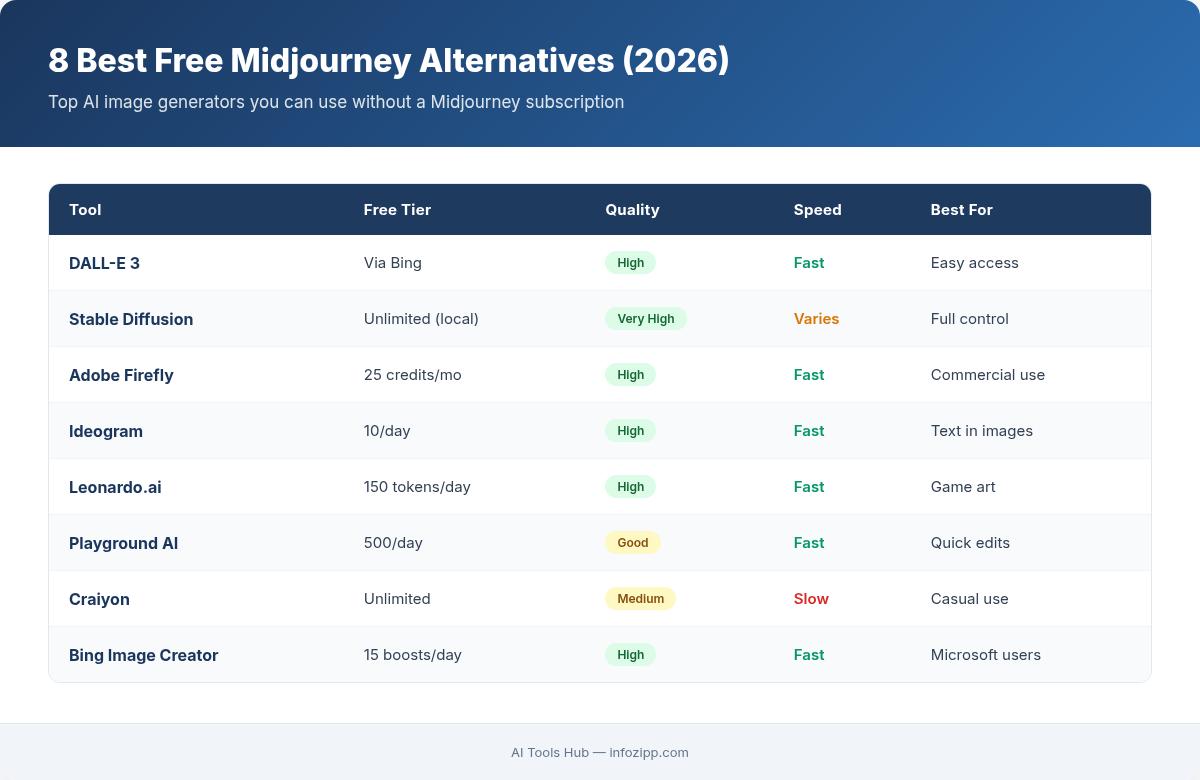
Quick Comparison Table
Before we dive deep, here is a bird’s-eye view of every tool versus Midjourney as a baseline.
| Tool | Quality vs Midjourney | Free Tier Limit | Best For | Text in Images |
|---|---|---|---|---|
| Midjourney (baseline) | 10/10 | None — starts at $10/mo | Professional art & illustration | Poor |
| Leonardo AI | 8.5/10 | 150 tokens/day (~150 images) | All-around creative work | Fair |
| Stable Diffusion (Local) | 8/10 | Unlimited (runs on your GPU) | Privacy, customization, full control | Poor–Fair |
| Bing Image Creator | 8/10 | 15 fast + 200 prompts/day | Quick, high-quality images | Fair |
| Ideogram | 8/10 | ~25 images/day | Text-heavy designs, logos, posters | Excellent (95%+) |
| Craiyon | 5/10 | Unlimited (with ads) | Quick brainstorming, moodboards | Very Poor |
| BlueWillow | 6.5/10 | Unlimited on Discord | Beginners, casual exploration | Poor |
| Playground AI | 7.5/10 | 50 images/day | Social media graphics, editing | Fair |
| Google ImageFX | 8.5/10 | Free (Google account) | Photorealism, natural scenes | Fair–Good |
1. Leonardo AI — Best All-Around Free Alternative
Quality Rating: 8.5/10 vs Midjourney
Leonardo AI has quietly become one of the most capable AI image generators on the market, and its free tier is genuinely generous. With 150 daily tokens that reset every 24 hours, most casual users will never run out. The platform offers multiple fine-tuned models — from photorealistic to anime to architectural visualization — giving you flexibility that Midjourney cannot match at any price point.
Key Features:
- Multiple specialized AI models (Leonardo Diffusion XL, PhotoReal, DreamShaper, and more)
- Real-time Canvas for inpainting and outpainting
- Motion generation to animate still images
- Negative prompts and advanced parameter controls
- Image-to-image transformation
- Community-trained custom models
Free Tier Limits: 150 tokens per day (roughly 150 standard images). Tokens reset daily but do not roll over. All free generations are public. You still get commercial usage rights, though Leonardo retains ownership of the images under a royalty-free license.
Typical Output Quality: Leonardo produces images that rival Midjourney in many categories, especially photorealism and character design. Colors are vibrant, compositions are well-balanced, and fine details like skin texture and fabric folds are handled impressively. Where it falls slightly behind Midjourney is in that signature “artistic coherence” — Midjourney images tend to feel more intentionally styled, while Leonardo outputs can occasionally look a bit generic without careful prompting.
Best For: Creators who want a versatile, browser-based tool with multiple model options and a generous daily limit. If you could only pick one free alternative, this is the one.
2. Stable Diffusion (Local) — Best for Unlimited, Private Generation
Quality Rating: 8/10 vs Midjourney
Stable Diffusion is the open-source powerhouse that changed everything. Running it locally on your own computer means zero monthly fees, zero content restrictions, zero daily limits, and complete privacy. In 2026, with Stable Diffusion 3.5 and the Flux model family available, the quality ceiling has risen dramatically.
Key Features:
- Completely free and open source — runs offline on your hardware
- Thousands of community models on CivitAI and Hugging Face
- LoRA fine-tuning for custom styles and characters
- ControlNet for precise pose, depth, and edge control
- Multiple UI options: WebUI Forge (recommended for 2026), ComfyUI, Fooocus, Easy Diffusion
- Inpainting, outpainting, img2img, upscaling, batch processing
Free Tier Limits: Truly unlimited — you are only limited by your GPU. Minimum requirement is an NVIDIA GPU with 6GB+ VRAM (GTX 1060 or newer). For the latest SD 3.5 and Flux models, 12-16GB VRAM is recommended. Expect 20GB of disk space for the initial setup.
Typical Output Quality: This depends entirely on which model and settings you use. With the right model (like Flux.1 Dev or a well-trained SDXL checkpoint), Stable Diffusion can match or even exceed Midjourney in specific niches — photorealistic portraits, anime art, and architectural renders are standout categories. The learning curve is steeper, but the ceiling is higher. Default outputs without optimization will look noticeably below Midjourney quality, so expect to spend time learning prompt engineering and model selection.
Best For: Technical users who want full control, unlimited generations, and complete privacy. Also ideal for developers building AI art into applications, and anyone who wants to train custom models on specific styles.
3. Bing Image Creator — Best for Zero-Effort High Quality
Quality Rating: 8/10 vs Midjourney
Microsoft’s Bing Image Creator is the sleeper hit of free AI art tools. Powered by DALL-E 3 and now also GPT-4o’s image generation, it delivers genuinely impressive results with zero setup — just type a prompt and go. The fact that you get access to two of OpenAI’s most powerful image models completely free is remarkable.
Key Features:
- Dual model access: DALL-E 3 and GPT-4o image generation
- No software installation — works directly in the browser
- Generates four image variations per prompt
- Strong prompt adherence and natural language understanding
- Integrated with Microsoft Copilot for conversational image creation
- Microsoft Rewards integration for earning additional boost credits
Free Tier Limits: 15 fast (boosted) generations per day, with 25 additional boost credits weekly. After boosts are used, generation continues at slower speeds. Total cap of 200 prompts per 24-hour period. Additional boosts available through Microsoft Rewards points.
Typical Output Quality: With DALL-E 3, you get clean, well-composed images with excellent prompt following — it understands complex multi-element prompts better than most competitors. The GPT-4o model adds even more photorealistic capabilities. Colors are accurate, compositions are balanced, and the overall “polish” is high. The main weakness compared to Midjourney is artistic style — images tend toward a slightly “digital illustration” look rather than the painterly quality Midjourney is known for.
Best For: Anyone who wants fast, high-quality images without creating yet another account or learning a new interface. Perfect for content creators, bloggers, and marketers who need quality images immediately.
4. Ideogram — Best for Text in Images
Quality Rating: 8/10 vs Midjourney
If you have ever tried to generate an image with readable text using Midjourney, DALL-E, or Stable Diffusion, you know the pain — garbled letters, misspelled words, and nonsensical typography. Ideogram solves this problem definitively. With version 3.0, Ideogram achieves 95%+ text accuracy in generated images, compared to roughly 30-50% for most competitors. For any use case involving text, this is the clear winner.
Key Features:
- Industry-leading text rendering accuracy (95%+)
- Style References — upload up to three images to guide visual style
- Multiple aspect ratios and style presets
- Strong general image generation beyond just text
- Clean web interface with community gallery
- Ideogram 3.0 engine with improved composition and detail
Free Tier Limits: Approximately 25 images per day on the free plan. Free-tier images include a watermark, and commercial use is restricted to paid plans. During peak hours, free users may experience 2-3 minute generation times in the slow queue.
Typical Output Quality: General image quality is very competitive — photorealistic scenes, illustrations, and abstract art all look polished and detailed. The standout is text: logos, posters, social media quotes, book covers, and signage all render with crisp, correctly spelled text. Overall artistic style leans clean and modern rather than the moody, atmospheric quality of Midjourney. For text-free artwork, it is roughly on par with DALL-E 3 but below Midjourney’s artistic refinement.
Best For: Designers creating logos, posters, social media graphics, product mockups, or any visual that includes text. Also excellent for typography-heavy marketing materials.
5. Craiyon — Best for Quick, No-Account Brainstorming
Quality Rating: 5/10 vs Midjourney
Craiyon (formerly DALL-E Mini) is the most accessible AI art generator in existence. No account required, no signup, no credit card — just type a prompt and get nine images in about 45 seconds. It is not going to win any quality contests, but for rapid brainstorming and conceptual exploration, the zero-friction approach is genuinely valuable.
Key Features:
- Zero signup required — completely anonymous usage
- Generates nine image variations per prompt in a 3×3 grid
- Negative prompt support to exclude unwanted elements
- Style presets: Art, Drawing, Photo, and more
- Multi-language prompt support
- Works in any browser on any device
Free Tier Limits: Effectively unlimited, but with significant trade-offs. Free users see ads, experience ~45-second generation times, receive lower-resolution outputs, and cannot choose aspect ratios. There is no daily generation cap, which makes it unique among free tools.
Typical Output Quality: Let us be honest — Craiyon is clearly the weakest in raw image quality. Images often have a blurry, dreamlike quality. Human faces frequently appear warped or distorted. Text rendering is almost always garbled. Complex scenes with multiple subjects tend to produce muddled, incoherent results. However, for simple concepts, abstract ideas, and quick visual brainstorming, the results are serviceable. Think of it as a visual sketchpad, not a finished-art generator.
Best For: Quick concept exploration, moodboarding, and visual brainstorming when you do not want to create an account anywhere. Good for educators and students experimenting with AI art for the first time.
6. BlueWillow — Best Free Midjourney-Style Experience
Quality Rating: 6.5/10 vs Midjourney
BlueWillow is essentially “Midjourney Lite” — it operates through Discord with a nearly identical command structure, making it the most familiar option for anyone who has used Midjourney before. The free tier is genuinely generous with no hard daily cap under normal usage, and the community Discord server is active and helpful.
Key Features:
- Discord-based interface (similar workflow to Midjourney)
- Web interface also available for non-Discord users
- Generates up to four images per prompt
- Built-in refine and upscale tools
- Supports logos, graphics, photorealistic scenes, and digital artwork
- Active community for prompt sharing and inspiration
Free Tier Limits: Unlimited image generation on Discord under fair-use terms. No hard daily cap for typical usage patterns. The Pro subscription ($29.99/month) provides 5,000 credits for higher-volume production needs.
Typical Output Quality: BlueWillow produces decent results across a range of styles, but it is noticeably below Midjourney, Leonardo, and Bing Image Creator in overall quality. Images sometimes lack fine detail, colors can appear slightly flat, and complex compositions may not hold together as well. That said, for logos, simple illustrations, and basic creative work, the quality is perfectly adequate. Think of it as good enough for non-critical uses.
Best For: Midjourney users looking for a free Discord-based alternative with a familiar workflow. Also great for beginners who want to join an active community and learn from others.
7. Playground AI — Best for Mixed Editing and Design
Quality Rating: 7.5/10 vs Midjourney
Playground AI positions itself as more than just an image generator — it is a design tool that combines AI generation with traditional editing capabilities. The free tier gives you 50 images per day, and the built-in canvas editor means you can refine, composite, and adjust your creations without switching to a separate tool.
Key Features:
- Combined AI generation and canvas editing in one interface
- Multiple AI model options within the platform
- Templates and design elements for quick compositions
- Inpainting and outpainting directly on the canvas
- Style filters and aesthetic presets
- Community gallery for prompt and style discovery
Free Tier Limits: 50 images per day with fixed image dimensions. Limits are based on a rolling hourly window rather than a hard daily reset. Free images can be used for personal projects, but commercial use is restricted to paid plans. The Pro plan ($15/month) unlocks 1,000 images/day with no dimension or quality restrictions.
Typical Output Quality: Playground produces solid results that sit comfortably in the middle of this list. Photorealistic images are competent but can look slightly processed. Illustrations and stylized art benefit from the built-in filters and presets. The real value is in the editing workflow — you can generate a base image, then refine specific areas, adjust compositions, and combine elements in ways that pure generators cannot match. The gap between Playground and Midjourney is most noticeable in photorealism and artistic refinement.
Best For: Social media creators and designers who want an integrated generate-and-edit workflow. Excellent for producing finished social media posts, thumbnails, and marketing graphics without leaving one platform.
8. Google ImageFX — Best for Photorealism
Quality Rating: 8.5/10 vs Midjourney
Google ImageFX is the dark horse on this list. Powered by Google DeepMind’s Imagen 3 model, it produces some of the most photorealistic AI images available anywhere — and it is completely free. The interface is minimal but effective, and the “expressive chips” feature makes prompt experimentation surprisingly intuitive.
Key Features:
- Powered by Imagen 3, Google DeepMind’s latest image model
- Expressive chips for quick prompt variation and exploration
- Aspect ratio controls, style guidance, and seed values for reproducibility
- SynthID watermarking (invisible, machine-detectable)
- Clean, minimal interface with no clutter
- Free with only a Google account required
Free Tier Limits: Completely free to use — Google does not charge for ImageFX. You need a Google account and must be in a supported region (currently US, UK, Australia, New Zealand, Kenya, and select other countries). There is no publicly stated daily generation limit, though Google may throttle heavy usage. VPN access from unsupported regions may work but is not guaranteed.
Typical Output Quality: ImageFX produces some of the most photorealistic results in this entire list. Natural scenes, portraits, food photography, and architectural images look strikingly real — often indistinguishable from photographs at first glance. The Imagen 3 engine handles lighting, shadows, reflections, and material textures with remarkable fidelity. Where it falls short compared to Midjourney is in stylized and artistic outputs — if you want a painterly, fantastical, or highly stylized aesthetic, Midjourney still has the edge. But for pure photorealism, ImageFX is arguably the best free option available in 2026.
Best For: Anyone who needs photorealistic images — product mockups, stock photo alternatives, realistic portraits, and natural scene generation. Also excellent for marketers and content creators who need images that look like real photographs.
Side-by-Side Quality Comparison
To understand how these tools truly stack up, let us walk through how each handles common generation scenarios.
Photorealistic Portrait
Prompt: “Professional headshot of a 30-year-old woman, soft studio lighting, neutral background”
Midjourney: Near-perfect. Skin texture, hair strands, catchlights in eyes — everything looks magazine-quality with an artistic edge.
Leonardo AI: Excellent. Very close to Midjourney, especially with the PhotoReal model. Occasionally slightly over-smoothed skin.
Google ImageFX: Excellent. Arguably the most “photographically real” — less stylized than Midjourney, more like an actual camera output.
Bing Image Creator: Very good. Clean, well-lit, natural-looking. Slightly less refined than the top three.
Stable Diffusion: Model-dependent. With the right checkpoint (Flux.1 Dev, RealVisXL), matches or exceeds Midjourney. Default models fall short.
Playground AI: Good. Competent but can look slightly processed or “AI-ish” in skin rendering.
Ideogram: Good. Clean and professional, but not quite photorealistic — has a slight digital illustration feel.
BlueWillow: Acceptable. Decent composition but lacks fine detail. Hair and skin textures are noticeably simplified.
Craiyon: Poor. Faces are often distorted. Not suitable for portrait work.
Fantasy Landscape
Prompt: “Ethereal floating islands with waterfalls, glowing crystal formations, dramatic sunset sky”
Midjourney: This is where Midjourney shines brightest. Atmospheric, moody, with a signature cinematic quality that no competitor fully replicates.
Leonardo AI: Very strong. Rich colors and good composition. The DreamShaper model handles fantasy themes exceptionally well.
Stable Diffusion: With the right model (SDXL fantasy checkpoints), results can be stunning. Requires more effort to achieve consistently.
Bing Image Creator: Good. Well-composed and colorful, but slightly “cleaner” and less atmospheric than Midjourney.
Google ImageFX: Competent but leans photorealistic even for fantasy prompts. Less “dreamy” than ideal for this category.
Playground AI & Ideogram: Decent results with good color handling but lacking the depth and atmosphere of the top generators.
BlueWillow & Craiyon: Struggle with complex fantasy compositions. Results tend to be flat or incoherent.
Logo with Text
Prompt: “Modern minimalist logo for a coffee shop called ‘DAWN BREW’ with a sunrise icon”
Ideogram: Clear winner. Text renders perfectly spelled with clean typography. The design is balanced and professional.
All others: Text is either garbled, misspelled, or absent. Midjourney included — this is the one category where it consistently fails.
Which Free Alternative Should You Choose?
Here is a quick decision guide based on your specific needs:
Choose Leonardo AI if…
You want the closest overall experience to Midjourney with a generous free tier. It covers the widest range of use cases competently and has an intuitive interface. This is the default recommendation for most users.
Choose Stable Diffusion if…
You have a capable GPU and want truly unlimited, private generation. The learning curve is worth it if you plan to use AI art regularly. Also the best choice if you need to fine-tune models on specific styles or integrate generation into your own applications.
Choose Bing Image Creator if…
You want great quality with zero friction. No new accounts (if you have a Microsoft account), no learning curve, no setup. The dual DALL-E 3 and GPT-4o model access is unbeatable for a free tool. Best for people who need occasional high-quality images quickly.
Choose Ideogram if…
Your images need to include readable text — period. No other tool comes close for logos, posters, social graphics with quotes, or any design where typography matters. This is a non-negotiable choice for text-in-image use cases.
Choose Google ImageFX if…
Photorealism is your primary goal. For stock-photo-style images, product shots, and realistic scene generation, ImageFX produces the most camera-like results. The lack of a daily limit and completely free pricing make it excellent for high-volume photorealistic needs.
Choose Playground AI if…
You need to generate AND edit images in the same tool. The integrated canvas editor saves significant time for social media creators who want to refine compositions, add elements, or adjust generated images without switching applications.
Choose BlueWillow if…
You are coming from Midjourney and want a familiar Discord-based workflow without paying. Also good for beginners who benefit from an active community. The no-cap free tier is appealing for casual exploration.
Choose Craiyon if…
You need quick visual brainstorming with absolutely zero barriers — no signup, no account, no cost. Quality is the lowest on this list, but the accessibility is unmatched. Great for education and experimentation.
Final Thoughts
The gap between Midjourney and its free alternatives has narrowed dramatically in 2026. While Midjourney still holds the crown for overall artistic quality and that distinctive “Midjourney look,” the practical difference for most use cases is increasingly small.
For the majority of users — bloggers, social media creators, marketers, hobbyists — the free tools on this list will handle 90% of what you need without spending a dollar. Leonardo AI and Google ImageFX come closest to Midjourney’s overall quality. Ideogram dominates text rendering. Stable Diffusion offers the most power and customization. Bing Image Creator provides the best zero-effort experience.
Our recommendation: start with Leonardo AI or Bing Image Creator for immediate results, then explore Stable Diffusion if you want deeper control and unlimited generation. And whenever you need text in your images, Ideogram is the only serious choice in 2026.
The best AI art tool is the one that fits your specific workflow — and when that tool is free, even better.
For the latest AI image generation comparisons and tutorials, bookmark AI Tools Hub — we test every tool so you can create with confidence.
Explore More on AI Tools Hub

Alex Kim is an AI tools reviewer and tech writer with over 5 years of experience evaluating SaaS and AI products. He specializes in hands-on comparisons of AI writing assistants, coding tools, and productivity software — testing each tool through real-world workflows before publishing any recommendation. His mission at AI Tools Hub is to help readers cut through the hype and find AI tools that actually deliver results.