Choosing a design tool used to mean choosing complexity. Today, AI-powered platforms have changed that equation entirely. Whether you need social media graphics, marketing visuals, product prototypes, or brand assets, Canva AI, Adobe Firefly, and Figma AI each promise to make professional design accessible to everyone.
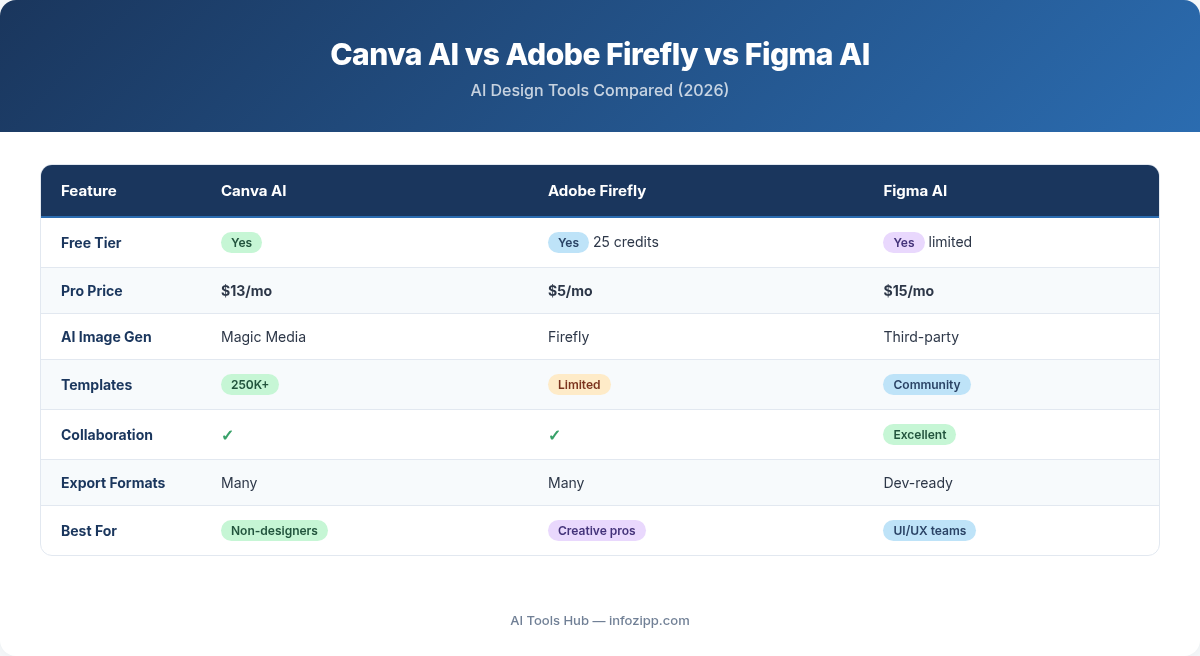
But which one actually delivers for non-designers? After testing all three platforms extensively, here is the straightforward answer:
In this AI Tools Hub comparison, we put all three platforms to the test so you can find the right AI design tool without the learning curve.
- Canva AI is the easiest option for anyone who needs polished designs fast
- Adobe Firefly is the safest choice for commercial use with IP protection
- Figma AI is the best pick for teams building digital products and apps
Let us break down exactly why, with detailed feature comparisons, real pricing, and specific recommendations based on your role.
Quick Comparison Table: Canva AI vs Adobe Firefly vs Figma AI
| Feature | Canva AI (Magic Studio) | Adobe Firefly | Figma AI |
|---|---|---|---|
| Best For | Non-designers, marketers | Commercial-safe AI imagery | Product teams, UI/UX |
| AI Image Generation | Magic Media (text-to-image) | Image Model 4 (photorealistic) | Basic image generation |
| AI Writing | Magic Write (OpenAI-powered) | Limited (captions only) | Content generation for UI |
| Templates | 250,000+ templates | Limited (Adobe Express) | Community templates |
| Brand Kit | Yes (Pro and above) | Via Creative Cloud libraries | Design systems and tokens |
| Copyright Safety | Standard (licensed stock) | Industry-leading (Adobe Stock trained) | Standard |
| Starting Price | Free / $15 per month Pro | Free / $9.99 per month Standard | Free / $15 per user per month |
| Learning Curve | Minimal (drag-and-drop) | Moderate | Moderate to steep |
Canva AI Deep Dive: The Non-Designer’s Best Friend
Canva has built its reputation on making design accessible, and its Magic Studio suite takes that mission further with AI. For non-designers who need professional-looking content without a learning curve, Canva remains the default choice in 2026.
Key AI Features in Magic Studio
Magic Design is the flagship feature. Describe what you need — a social media post, a presentation, a flyer — and Canva generates multiple design options using your brand colors, fonts, and logo. Upload an image or type a prompt, and you get ready-to-customize layouts in seconds.
Magic Media handles text-to-image and text-to-video generation directly inside the editor. Choose from 25 different image styles including Filmic, Dreamy, Retrowave, and Watercolor. The results are not Midjourney-quality, but they are more than adequate for social media posts, blog headers, and marketing materials.
Magic Write is an AI copywriter powered by OpenAI that generates, summarizes, expands, and rewrites text. Need Instagram captions, blog outlines, or ad copy? Magic Write produces drafts you can refine without leaving Canva.
Magic Eraser and Magic Edit let you remove unwanted objects from photos or replace elements with AI-generated alternatives. Magic Expand extends image boundaries intelligently, which is invaluable when you need to resize a photo for different social media dimensions.
Magic Switch instantly converts designs between formats. Turn a presentation into a blog post, resize an Instagram post for LinkedIn, or translate content into over 100 languages with a single click.
Template Library and Brand Kit
Canva offers over 250,000 professionally designed templates spanning every content type imaginable. The Brand Kit feature (available on Pro and above) stores your brand colors, fonts, logos, and voice guidelines, ensuring every AI-generated design stays on-brand automatically.
Canva Pricing (2026)
| Plan | Monthly Cost | Annual Cost | Key AI Features |
|---|---|---|---|
| Free | $0 | $0 | Limited Magic Design, basic templates, 5 GB storage |
| Pro | $15 | $120/year | Full Magic Studio, Brand Kit, 100M+ stock photos, 100 GB storage |
| Teams | $10/user | $100/user/year | Everything in Pro plus team collaboration, approval workflows |
| Enterprise | Custom | Custom | SSO, SCIM, advanced admin controls, dedicated support |
Verdict on Canva AI: If you are a non-designer who needs to create content regularly, Canva is the most intuitive and cost-effective option. The free tier is surprisingly capable, and Pro at $15 per month unlocks virtually everything most individuals need.
Adobe Firefly Deep Dive: The Copyright-Safe Powerhouse
Adobe Firefly approaches AI design from a fundamentally different angle than Canva. While Canva focuses on templates and ease of use, Firefly focuses on generative AI image quality and commercial safety. For anyone creating content for commercial use, this distinction matters enormously.
Trained on Licensed Content
Every Firefly model is trained exclusively on Adobe Stock images (with contributor consent), openly licensed content, and public domain works. This is not a marketing claim — it is the foundation of Firefly’s entire value proposition. Unlike tools trained on scraped web data of uncertain provenance, Firefly’s training data has a clear legal chain of custody.
Key AI Features
Image Model 4 is Firefly’s latest generation, delivering photorealistic rendering with superior text rendering in images, precise lighting control, and accurate camera angle interpretation. The jump in quality from earlier models is substantial.
Generative Fill and Generative Expand are integrated directly into Photoshop and the Firefly web app. Select an area, describe what you want, and Firefly adds, removes, or extends content seamlessly. This is where Firefly outperforms every competitor for photo editing tasks.
Text-to-Vector (Vector Model 2) generates editable SVG paths, gradients, and patterns from text prompts — essential for anyone who works in Adobe Illustrator. Generative Recolor lets you explore color variations for vector art instantly.
Text Effects applies textures and visual styles to text, creating typographic art that would take hours to produce manually.
Multi-Model Access is a 2026 addition. Firefly now provides access to top AI models from Google, OpenAI, Runway, Black Forest Labs, and more — all through a single login. You can mix and match outputs from different models for your projects.
IP Indemnification
Adobe offers IP indemnification for content generated with Firefly. For enterprise customers on ETLA agreements, this covers up to $3 million per asset. For VIP customers, coverage extends to $10,000 per asset. This means if you face a copyright claim over Firefly-generated content, Adobe covers your legal defense and potential damages. No other mainstream design tool offers comparable protection.
Creative Cloud Integration
Firefly is not a standalone island. It integrates directly with Photoshop, Illustrator, Adobe Express, Premiere Pro, and InDesign. AI features appear natively in tools creative professionals already use, which eliminates the friction of switching between applications.
Adobe Firefly Pricing (2026)
| Plan | Monthly Cost | Credits | Key Features |
|---|---|---|---|
| Free | $0 | 25/month | Limited resolution, watermarked downloads, web app only |
| Firefly Standard | $9.99 | 2,000 premium | Unlimited standard generations, full resolution, commercial rights |
| Firefly Pro | $19.99 | 4,000 premium | Everything in Standard plus video generation, audio, translation |
| Firefly Premium | $199.99 | 50,000 premium | High-volume commercial use, all partner models |
| Creative Cloud (All Apps) | $59.99 | 1,000 premium | Full Adobe suite plus Firefly integrated into every app |
An important note: all paid Firefly plans now include unlimited standard generations. Credits are only consumed by premium features like video generation, audio creation, translation, and partner model outputs.
Verdict on Adobe Firefly: If commercial safety and image quality are your priorities, Firefly is unmatched. The $9.99 Standard plan with unlimited standard generations is genuinely excellent value. The learning curve is steeper than Canva, but the output quality justifies it for professional use.
Figma AI Deep Dive: The Product Team’s Secret Weapon
Figma AI serves a distinctly different audience than Canva or Firefly. While those tools focus on creating visual content, Figma AI is built for designing digital products — apps, websites, dashboards, and interfaces. If you are building something interactive, Figma AI is where the action is in 2026.
Figma Make: AI App Generation
Figma Make is the headline feature. Describe an application in plain language, and Figma generates a multi-screen prototype with navigation, states, and basic interactions. This is not just mockups — these are functional prototypes you can interact with, test, and iterate on.
Since January 2026, Figma Make prototypes can be embedded directly into Figma Design, FigJam, and Figma Slides. You can start with a prompt, refine in the visual editor, adjust code for more control, or prompt again to explore new directions. The workflow is remarkably fluid.
Key AI Features
AI-Powered Auto Layout automatically creates responsive designs that adapt to different screen sizes. Components stretch and reflow intelligently, and the layout translates directly into code — making developer handoff significantly smoother.
AI Image Generation and Editing includes text-to-image generation, background removal, and resolution boost. These are not as powerful as Firefly’s image tools, but they are adequate for placeholder content and UI mockups.
AI Search and Layer Renaming uses visual understanding to find specific elements in complex files and automatically renames messy layers into meaningful names. This sounds minor but saves enormous time on large projects.
Code Generation translates designs into production-ready code, bridging the gap between design and development.
Developer Handoff and Dev Mode
Dev Mode is Figma’s dedicated environment for developers. It provides code properties, annotations, and an MCP server for seamless handoff. Designers create; developers implement — with AI reducing the translation errors between the two.
Prototyping Excellence
Figma’s prototyping capabilities go beyond static mockups. Create interactive overlays, use Smart Animate for smooth transitions, and choose from springs, slides, dissolves, and custom animations. Connect to a backend to preview exactly how your app will look and behave with real user data.
Figma Pricing (2026)
| Plan | Monthly Cost | AI Credits/Month | Key Features |
|---|---|---|---|
| Starter (Free) | $0 | 500 (150/day cap) | 3 design files, 3 FigJam files, basic AI features |
| Professional | $15/user ($20 monthly) | 3,000 | Unlimited files, Figma Make, full AI suite, team libraries |
| Organization | Custom (annual) | 3,500 | SSO, advanced admin, design system analytics |
| Enterprise | ~$90/user (annual) | 4,250 | Multiple IdP support, dedicated support, workspaces |
Additional AI credits can be purchased: add-on packs run $120 to $240 per month for 5,000 to 10,000 credits, or pay-as-you-go at $0.03 per credit (available Q2 2026).
Verdict on Figma AI: If you are building apps, websites, or digital products, Figma AI with Figma Make is transformative. It is overkill for social media graphics or marketing flyers, but unmatched for product design and prototyping.
Head-to-Head Comparison: 7 Critical Categories
1. Ease of Use
Winner: Canva AI. Canva’s drag-and-drop interface requires zero design knowledge. Magic Design generates complete layouts from a single prompt. Adobe Firefly requires more intentional prompting and some understanding of creative controls. Figma has the steepest learning curve, designed for people who think in terms of components, auto layout, and design systems.
2. AI Image Generation Quality
Winner: Adobe Firefly. Firefly’s Image Model 4 produces the most photorealistic results with the best prompt adherence. The text rendering within images is notably superior. Canva’s Magic Media is good for quick social content but lacks the precision and quality ceiling of Firefly. Figma’s image generation is functional but clearly not the platform’s focus.
3. Templates and Quick-Start Design
Winner: Canva AI. With over 250,000 templates covering every format from Instagram Stories to pitch decks, Canva is unrivaled. Adobe Express (bundled with Creative Cloud) offers templates but a smaller library. Figma relies on community-created templates and the Figma Make prompt-to-prototype approach rather than traditional templates.
4. Brand Kit and Consistency
Winner: Canva AI (for simplicity) / Figma AI (for depth). Canva’s Brand Kit is the easiest to set up and automatically applies brand elements to AI-generated designs. Figma’s design systems with variables and tokens are far more powerful but require setup effort. Adobe’s approach through Creative Cloud Libraries works well but spans multiple applications.
5. Team Collaboration
Winner: Figma AI. Real-time multiplayer editing has been Figma’s core strength since day one. Multiple team members can work on the same file simultaneously with zero friction. Canva offers solid collaboration features, but Figma’s implementation is more mature, especially for complex projects. Adobe’s collaboration tools are improving but remain fragmented across different applications.
6. Copyright Safety and Commercial Use
Winner: Adobe Firefly. This is not close. Firefly’s training exclusively on licensed Adobe Stock content, combined with IP indemnification covering up to $3 million per asset for enterprise customers, sets the industry standard. Canva provides standard commercial licenses for its AI-generated content. Figma’s AI outputs follow standard terms. For regulated industries or high-stakes commercial projects, Firefly is the clear choice.
7. Pricing Value
Winner: Depends on your needs. For individual creators, Canva Pro at $15 per month offers the broadest set of design tools for the price. Adobe Firefly Standard at $9.99 per month with unlimited standard generations is the best value purely for AI image generation. Figma at $15 per user per month is competitive for product design teams, but costs scale quickly as teams grow.
Which Tool Should You Choose? Recommendations by Role
Social Media Managers and Content Marketers
Choose Canva AI. You need to produce high volumes of on-brand content across multiple platforms quickly. Canva’s template library, Magic Switch for format conversion, and Magic Write for captions make it the obvious choice. The free tier handles occasional needs; Pro at $15 per month covers serious content creation.
Solopreneurs and Small Business Owners
Choose Canva AI, with Firefly Standard as a supplement. Canva handles your daily design needs — social posts, presentations, business cards, flyers. When you need higher-quality AI-generated images for product mockups or advertising, Firefly Standard at $9.99 per month fills the gap with commercial safety built in.
Enterprise Marketing Teams
Choose Adobe Firefly (with Creative Cloud) as the primary tool. IP indemnification is non-negotiable at scale. The Creative Cloud ecosystem provides Photoshop, Illustrator, and Premiere Pro alongside Firefly for a complete creative workflow. Add Canva Teams for quick, templatized content that does not require the full Adobe treatment — as covered here on AI Tools Hub, using multiple specialized tools is often the optimal strategy.
Students and Beginners
Choose Canva Free, then Figma Starter. Canva Free is the fastest path to creating professional-looking designs with no cost and no learning curve. Once you are comfortable with design concepts, Figma Starter (also free) introduces you to professional design tools and prototyping that will serve you well in any design or tech career.
Product Designers and App Developers
Choose Figma AI. Figma Make generates functional prototypes from prompts, Dev Mode streamlines developer handoff, and the collaborative editing environment is purpose-built for product teams. No other tool in this comparison comes close for UI/UX design workflows.
Content Creators and YouTubers
Choose Canva Pro, supplemented with Firefly Pro. Canva handles thumbnails, social graphics, and video templates. Firefly Pro adds AI video generation, audio creation, and multi-language translation — increasingly essential for creators reaching global audiences.
Final Verdict: There Is No Single Best Tool
The honest answer is that Canva AI, Adobe Firefly, and Figma AI serve different purposes, and the smartest approach in 2026 is choosing based on your actual workflow rather than looking for one tool that does everything.
If you only pick one:
- Pick Canva AI if you create social media content, presentations, and marketing materials and want the fastest path from idea to finished design
- Pick Adobe Firefly if AI-generated image quality and commercial safety are your top priorities, especially for advertising, product imagery, or any use case where copyright claims would be costly
- Pick Figma AI if you design digital products, build prototypes, or work on a team that needs to translate designs into functional code
The good news is that all three offer free tiers worth trying. Start with the one that matches your primary use case, and layer in additional tools as your needs evolve. The days of needing years of design training to create professional visual content are definitively over.
Frequently Asked Questions
Can I use Canva AI-generated images commercially?
Yes. Canva Pro and Teams plans include commercial usage rights for AI-generated content. The free plan has more restrictive terms, so check Canva’s content license agreement for specifics on free tier usage.
Is Adobe Firefly really trained only on licensed content?
Yes. Adobe confirms that every Firefly model is trained exclusively on Adobe Stock images (with contributor consent), openly licensed content, and public domain works. This is backed by IP indemnification for paid plan users.
Does Figma AI require coding knowledge?
No. Figma Make generates prototypes from plain-language descriptions, and the visual editor requires no coding. However, Figma does offer code editing for users who want more precise control over generated outputs.
Which tool has the best free plan for AI features?
Canva Free offers the most usable AI features at no cost, including limited Magic Design and Magic Write access. Figma Starter provides 500 AI credits per month. Adobe Firefly Free gives only 25 credits per month, which is quite limiting for regular use.
Can I use multiple tools together?
Absolutely, and many professionals do. A common combination is Canva for quick social media content, Firefly for high-quality commercial imagery, and Figma for product design. Each tool exports in standard formats that work across platforms.
Which AI design tool is best for teams?
For design and product teams, Figma AI offers the best real-time collaboration with multiplayer editing, design systems, and Dev Mode. For marketing teams creating branded content, Canva Teams provides better template management and approval workflows. For creative teams working in the Adobe ecosystem, Firefly integrates across all Creative Cloud applications.
Explore More on AI Tools Hub

Alex Kim is an AI tools reviewer and tech writer with over 5 years of experience evaluating SaaS and AI products. He specializes in hands-on comparisons of AI writing assistants, coding tools, and productivity software — testing each tool through real-world workflows before publishing any recommendation. His mission at AI Tools Hub is to help readers cut through the hype and find AI tools that actually deliver results.