The AI-powered coding editor war is heating up in 2026, and developers have never had more options. If you’ve been researching Windsurf vs Cursor vs VS Code Copilot, you’re not alone — this is one of the most debated topics in the developer community right now. Each tool promises to supercharge your productivity with AI, but they take very different approaches to get there.
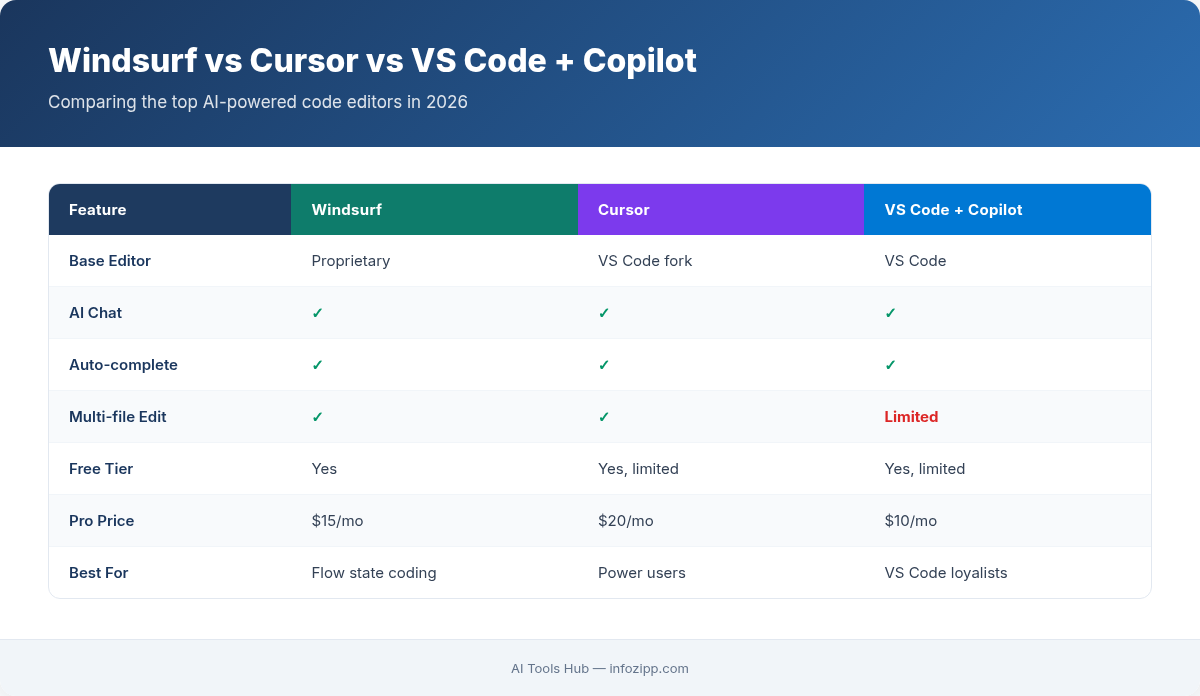
Windsurf (built by Codeium) burst onto the scene as the ambitious newcomer. Cursor redefined what an AI-first IDE could look like. And VS Code with GitHub Copilot remains the default choice for millions. But which one actually delivers the best experience for your workflow?
In this comprehensive comparison from AI Tools Hub, we’ll break down every angle — from AI code generation quality and context windows to pricing, extensions, and team collaboration. By the end, you’ll know exactly which AI IDE deserves a spot on your machine.
What Are These AI IDEs? A Quick Overview
Before we dig into the head-to-head comparison, let’s establish what each tool actually is and where it comes from.
Windsurf by Codeium
Windsurf is a standalone AI IDE developed by Codeium, the company previously known for its free AI code completion extension. Launched in late 2024 and rapidly evolving through 2025-2026, Windsurf is built on a VS Code fork but takes the “AI-native” concept further than most competitors. Its headline feature is Cascade — an agentic AI system that can understand your entire codebase, plan multi-step tasks, and execute changes across multiple files autonomously.
What makes Windsurf stand out:
- Cascade Agentic Mode: Goes beyond simple autocomplete — it can plan, reason, and execute complex coding tasks step by step
- Deep codebase awareness: Indexes your entire project for contextually relevant suggestions
- Generous free tier: Codeium has historically offered more free usage than competitors
- Built-in terminal AI: Natural language commands directly in the integrated terminal
- Supercomplete: Predicts not just the next line but your next likely action (creating a file, running a command)
Cursor
Cursor is the AI-first code editor that arguably started the modern AI IDE movement. Also a VS Code fork, Cursor was founded with the explicit mission of building the “editor of the future.” It gained massive traction in 2024-2025 by offering deeply integrated AI features that felt native rather than bolted on.
What makes Cursor stand out:
- Composer (Agent Mode): Multi-file editing with AI that understands project-wide context and can create, modify, and delete files
- Cmd+K inline editing: Highlight code and describe changes in natural language — one of the smoothest inline edit experiences available
- Custom AI rules (.cursorrules): Define project-specific coding standards that the AI follows consistently
- Multi-model support: Switch between GPT-4o, Claude 3.5/4 Sonnet, and other models on the fly
- Tab prediction: Context-aware autocomplete that predicts multi-line edits, not just single-line completions
VS Code + GitHub Copilot
GitHub Copilot is the original AI coding assistant that kicked off this entire revolution. Backed by Microsoft and OpenAI, Copilot runs as an extension inside VS Code (and other editors). In 2026, it has evolved significantly from its early autocomplete-only days, now offering chat, inline editing, and an agent mode.
What makes VS Code + Copilot stand out:
- Copilot Agent Mode: Introduced in VS Code 1.99+, this lets Copilot autonomously plan and execute multi-step tasks, run terminal commands, and iterate on errors
- Massive extension ecosystem: Full access to VS Code’s 50,000+ extensions — no compatibility concerns
- Copilot Chat: Context-aware chat sidebar with @workspace, @terminal, and @vscode commands for scoped questions
- Enterprise-grade security: GitHub’s code referencing filter, IP indemnity, and organizational policy controls
- Free tier available: GitHub Copilot Free offers 2,000 completions and 50 chat messages per month at no cost
Windsurf vs Cursor vs VS Code Copilot: Feature-by-Feature Comparison
Now let’s get into the details. We’ll compare these three across the dimensions that matter most to developers.
AI Code Generation Quality
All three tools leverage top-tier LLMs, but the quality of suggestions depends heavily on how well the tool provides context to those models.
Cursor currently leads in raw code generation quality for most developers. Its multi-model approach (letting you choose between Claude, GPT-4o, and others) means you can pick the best model for each task. Cursor’s context engine is sophisticated — it pulls in relevant files, recent edits, and linter errors to produce highly accurate suggestions. The Cmd+K inline editing is particularly polished, often nailing complex refactors on the first try.
Windsurf’s Cascade is impressive for agentic tasks — when you need the AI to plan and execute a multi-step feature, it can outperform Cursor by thinking through the entire workflow before writing code. However, for simple autocomplete and inline suggestions, it’s a step behind Cursor in consistency. Windsurf also supports multiple models, including Claude and GPT variants.
GitHub Copilot has improved dramatically with the addition of agent mode, but its autocomplete suggestions still lean toward simpler, more conservative completions. It’s reliable and rarely generates broken code, but it’s also less adventurous — it may not suggest the elegant refactor that Cursor or Windsurf would. The new agent mode in VS Code closes much of this gap for complex tasks.
Chat and Inline AI Features
The way you interact with the AI day-to-day matters as much as the raw quality.
Cursor offers the most refined inline editing experience. Hit Cmd+K on any selection, type what you want changed, and watch it transform. The chat panel is fast, supports image input (paste a screenshot of a UI you want built), and remembers conversation context well. Cursor also lets you reference specific files, docs, or even web pages in chat using the @ symbol.
Windsurf takes a slightly different approach with its Cascade panel. Instead of a simple chat, Cascade acts more like a junior developer — it shows its thought process, explains what it plans to do, and asks for confirmation before making changes. This is more transparent but can feel slower for quick edits. The inline completion (called Supercomplete) is fast and predicts entire code blocks.
Copilot’s chat experience in VS Code is solid but more utilitarian. The @workspace scope is genuinely useful for asking questions about your entire project. Inline suggestions appear automatically as you type and are generally fast. The new Copilot Edits feature (multi-file editing panel) bridges the gap with Cursor’s Composer, though it’s not quite as smooth yet.
Context Window and Codebase Understanding
How much of your project can the AI “see” at once? This is a critical differentiator.
Windsurf excels here. Codeium invested heavily in codebase indexing, and Windsurf indexes your entire repository locally. When you ask Cascade a question, it can pull relevant context from across your entire project — not just open files. This makes it particularly strong for large codebases where the relevant code might be spread across dozens of files.
Cursor also indexes your codebase and offers a similar experience with its @codebase command. You can explicitly include files in context, and Cursor is smart about pulling in related imports and type definitions. For Pro and Business users, Cursor provides larger context windows when using models like Claude with extended context.
Copilot has improved its context handling with the @workspace command, which searches across your project. However, it historically hasn’t indexed as deeply as Cursor or Windsurf. GitHub is actively improving this, and the enterprise version offers better codebase-wide understanding through Copilot Knowledge Bases.
Multi-File Editing and Agentic Capabilities
This is where the 2026 AI IDE war gets truly interesting. All three now offer some form of “agent mode.”
Cursor’s Composer was the pioneer of multi-file AI editing in IDEs. You describe a feature or change, and Composer creates, modifies, and deletes files as needed. It shows you a diff preview before applying changes, which gives you control. In agent mode, Composer can run terminal commands, check for errors, and iterate until the task is complete.
Windsurf’s Cascade takes the agentic concept further. It can autonomously browse documentation, create entire project scaffolds, write tests, and debug issues by running your code. The “Flows” feature combines chat context with action execution seamlessly. For greenfield projects or large refactors, Cascade’s planning ability is arguably the most advanced of the three.
Copilot Agent Mode (introduced in VS Code 1.99) is the newest entrant but backed by serious resources. It can autonomously edit files, run terminal commands, self-correct based on linter and compiler feedback, and iterate toward a solution. Being built directly into VS Code gives it tight integration with the editor’s debugging and testing infrastructure.
Extension Ecosystem and Compatibility
If you rely on specific VS Code extensions, this matters a lot.
VS Code + Copilot wins this category hands down. You get the full, official VS Code Marketplace with every extension working as intended. No compatibility issues, no lag in updates. Period.
Cursor supports most VS Code extensions since it’s a fork, but there can be occasional compatibility issues or delays when VS Code releases major updates. Most popular extensions (ESLint, Prettier, GitLens, Docker, etc.) work perfectly. Some Microsoft-specific extensions may not be available.
Windsurf is in a similar position to Cursor — it’s a VS Code fork with broad extension support, but not 100% compatibility. Codeium has been working to close these gaps, and the most critical extensions work well. However, you might occasionally find a niche extension that doesn’t behave correctly.
Language and Framework Support
All three tools support virtually every programming language, but their AI performance varies by language.
Copilot has the broadest training data thanks to GitHub’s massive code repository. It performs well across Python, JavaScript/TypeScript, Java, C#, Go, Rust, Ruby, PHP, and more. Its suggestions for popular frameworks (React, Django, Spring) are particularly strong.
Cursor performs best with Python, TypeScript/JavaScript, and Rust. Its multi-model approach means you can pick models that excel at specific languages. For example, Claude models tend to be stronger with Rust and systems programming.
Windsurf offers strong performance across mainstream languages, with particular strength in Python and JavaScript/TypeScript. Codeium’s training approach focuses on code understanding rather than memorization, which can lead to better suggestions for custom codebases with unique patterns.
Terminal Integration
AI in the terminal is becoming a key productivity feature.
Windsurf has the most seamless terminal AI integration. You can type natural language commands directly in the terminal, and Windsurf translates them into the correct shell commands. Cascade can also run terminal commands as part of its agentic workflows.
Cursor offers terminal AI through its Cmd+K shortcut in the terminal panel and through Composer’s agent mode. It can generate, explain, and debug terminal commands. The experience is solid but slightly less integrated than Windsurf’s approach.
Copilot provides terminal suggestions through the Ctrl+I shortcut in VS Code’s terminal. With agent mode, Copilot can now autonomously run and iterate on terminal commands. The @terminal scope in chat lets you ask questions about terminal output.
Pricing Comparison: Windsurf vs Cursor vs VS Code Copilot
Pricing is often the deciding factor for individual developers and teams. Here’s how they stack up in 2026:
| Feature | Windsurf (Codeium) | Cursor | VS Code + Copilot |
|---|---|---|---|
| Free Tier | Yes — generous autocomplete + limited Cascade flows | Yes — 2 weeks Pro trial, then limited free (2,000 completions) | Yes — 2,000 completions + 50 chat messages/month |
| Individual Plan | $15/month (Pro) | $20/month (Pro) | $10/month (Individual) |
| Team/Business Plan | $30/user/month (Teams) | $40/user/month (Business) | $19/user/month (Business) |
| Enterprise | Custom pricing | Custom pricing | $39/user/month (Enterprise) |
| Model Access | Multiple (GPT-4o, Claude, etc.) | Multiple (GPT-4o, Claude, Gemini, etc.) | GPT-4o, Claude (via extension), Gemini |
| Usage Limits (Paid) | Unlimited autocomplete, flow credits for premium models | 500 fast premium requests/month, unlimited slow | Unlimited completions and chat (fair use) |
Best value for individuals: Copilot at $10/month offers the most affordable premium experience. Windsurf at $15/month hits a sweet spot between price and advanced agentic features. Cursor at $20/month is the premium choice for developers who want the best AI editing experience.
Best value for teams: Copilot Business at $19/user/month is significantly cheaper than Cursor’s $40/user/month. Windsurf Teams at $30/user/month sits in the middle. However, price alone doesn’t tell the whole story — the productivity gains from a better AI experience can easily justify the cost difference.
Head-to-Head Summary Table
| Category | Winner | Notes |
|---|---|---|
| AI Code Quality | Cursor | Best inline editing, multi-model flexibility |
| Agentic / Multi-File | Windsurf | Cascade’s planning and execution is most advanced |
| Context Awareness | Windsurf | Deep codebase indexing is a core strength |
| Extension Ecosystem | VS Code + Copilot | Full official Marketplace, zero compatibility issues |
| Pricing (Individual) | VS Code + Copilot | $10/month is hard to beat |
| Pricing (Teams) | VS Code + Copilot | $19/user/month vs $30-40 for competitors |
| Terminal Integration | Windsurf | Most seamless natural language terminal experience |
| Language Breadth | VS Code + Copilot | Trained on GitHub’s massive codebase |
| Chat Experience | Cursor | Most polished chat with image input, @ references |
| Free Tier | Windsurf | Most generous free offering with agentic features |
Who Should Use What? Recommendations by Developer Type
There’s no single “best” AI IDE — the right choice depends on how you work. Here are our recommendations:
Beginners and Students
Best pick: Windsurf (Free) or VS Code + Copilot (Free)
Both offer generous free tiers. Windsurf’s Cascade is especially helpful for beginners because it explains its reasoning as it works, essentially teaching you while it codes. Copilot’s advantage is that VS Code has the most learning resources and community support available.
Experienced Individual Developers
Best pick: Cursor Pro ($20/month)
If you’re a productive developer who wants the AI to keep up with you, Cursor’s speed and inline editing quality are unmatched. The Cmd+K workflow becomes second nature fast, and the ability to switch between models gives you flexibility. The $20/month investment pays for itself in hours saved within the first week. If you’re also interested in terminal-based AI coding workflows, check out our comparison of Claude Code vs Cursor vs GitHub Copilot.
Teams and Companies
Best pick: VS Code + Copilot Business ($19/user/month)
For teams, Copilot’s combination of affordable per-seat pricing, enterprise security features, IP indemnity, and organizational policy controls makes it the pragmatic choice. IT departments appreciate the centralized management through GitHub. The full extension ecosystem also means teams don’t have to give up their existing tooling.
That said, if budget isn’t the primary concern and your team prioritizes cutting-edge AI capabilities, Cursor Business is worth evaluating. The custom .cursorrules feature is particularly valuable for enforcing team coding standards through AI.
Open-Source Contributors
Best pick: VS Code + Copilot (Free) or Windsurf (Free)
Open-source work often involves jumping between unfamiliar codebases, and both Copilot and Windsurf’s free tiers handle this well. Copilot’s code referencing filter is a bonus — it can alert you when suggestions match existing open-source code, helping you maintain license compliance. Windsurf’s deep codebase indexing is useful for quickly understanding new projects.
Full-Stack Developers Building Complete Features
Best pick: Windsurf Pro ($15/month)
If you regularly build features that span frontend, backend, database, and API layers, Windsurf’s Cascade agent is your best companion. Its ability to plan across your entire stack and execute multi-file changes in a logical sequence is unmatched. The price-to-capability ratio at $15/month is excellent. For more AI coding tool options (including free ones), see our roundup of the 7 best free AI coding tools in 2026.
What About Using Multiple Tools Together?
Here’s a secret many power users won’t tell you: you don’t have to pick just one. Many developers use a combination:
- VS Code + Copilot as the daily driver for general coding, debugging, and working within a familiar environment
- Cursor for intensive refactoring sessions, complex feature development, or when you need the best inline AI editing
- Windsurf for greenfield projects, large-scale refactors, or when you want the AI to take the lead on planning and execution
Since Cursor and Windsurf are both VS Code forks, your settings, keybindings, and muscle memory transfer easily between them. The switching cost is low.
The Verdict: Windsurf vs Cursor vs VS Code Copilot in 2026
The AI IDE landscape in 2026 is remarkably competitive, and developers are the winners. Here’s the bottom line:
Choose Cursor if you want the most polished AI coding experience today — the best inline editing, multi-model flexibility, and a workflow that makes you feel like the AI truly understands what you’re building.
Choose Windsurf if you want the most ambitious agentic AI assistant — one that can plan, reason, and execute complex tasks across your entire codebase. It’s the newcomer making the biggest waves, and its trajectory is impressive.
Choose VS Code + Copilot if you want the safest, most affordable option with the full VS Code ecosystem intact. It’s the pragmatic choice for teams, budget-conscious developers, and anyone who doesn’t want to leave the VS Code comfort zone.
No matter which you choose, the era of AI-assisted coding is here to stay. The real question isn’t whether to use an AI IDE — it’s which one matches your workflow best. Try the free tiers of all three, give each a week with your real projects, and let your own experience guide the decision.
Last updated: March 2026. The AI IDE space evolves rapidly. We’ll keep this comparison current as new features launch.
Explore More on AI Tools Hub

Alex Kim is an AI tools reviewer and tech writer with over 5 years of experience evaluating SaaS and AI products. He specializes in hands-on comparisons of AI writing assistants, coding tools, and productivity software — testing each tool through real-world workflows before publishing any recommendation. His mission at AI Tools Hub is to help readers cut through the hype and find AI tools that actually deliver results.