You have a big pitch tomorrow. Your boss wants a polished deck by end of day. Or maybe you’re a student who needs to turn a 20-page research paper into a presentation by Friday. Either way, you’re staring at a blank PowerPoint slide and the clock is ticking.
That scenario used to mean hours of dragging text boxes, hunting for stock photos, and fighting with alignment tools. In 2026, AI presentation tools can generate a complete, visually polished slide deck from a simple text prompt in under five minutes. But not all of these tools are created equal.
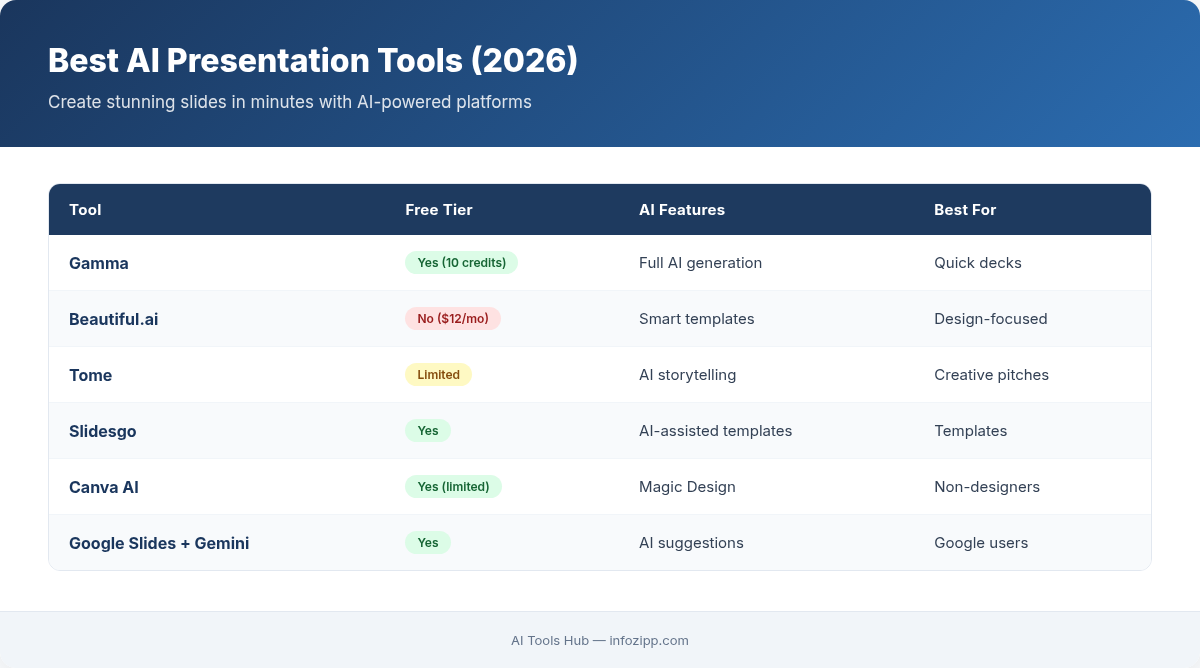
I’ve tested the six most capable AI presentation tools on the market to help you find the right one for your workflow, budget, and use case. Here’s a detailed, honest breakdown of each.
Why AI Presentation Tools Are Worth Your Attention
Before diving into the tools, let’s address the obvious question: do you really need an AI tool for presentations?
Consider the numbers. The average professional spends 4-8 hours creating a presentation from scratch. A significant portion of that time goes to design work — choosing layouts, formatting text, sourcing images, and making sure everything looks consistent. The actual content creation (the part that requires your expertise) is often a fraction of the total effort.
AI presentation tools attack this problem from two angles. First, they can generate slide content from a prompt, outline, or document, handling the writing and structuring for you. Second, they handle the design automatically, applying professional layouts, choosing appropriate visuals, and maintaining visual consistency throughout the deck.
The result is that a task that took half a day now takes 15-30 minutes — including the time you spend reviewing and refining the output. For freelancers juggling multiple projects, that time savings compounds into real money.
Gamma — Best Overall AI Presentation Tool
Gamma has emerged as the clear leader in AI-native presentations. Unlike tools that bolt AI onto existing presentation software, Gamma was built from the ground up around AI-first workflows.
How It Works
You start by giving Gamma a prompt, pasting in text, or uploading a document. The AI generates a complete presentation with appropriate content, layouts, and visuals. You can then edit everything directly in Gamma’s web-based editor, which feels more like a modern design tool than traditional slide software.
What Stands Out
- Adaptive card-based format — presentations automatically adjust to look great on any screen size, from phones to projectors
- One-click restyling — change the entire visual theme of your deck instantly without losing content
- Embedded content — you can embed videos, GIFs, charts, and interactive elements directly into slides
- AI image generation — Gamma can create custom images for your slides using built-in AI, so you’re not limited to stock photos
- Export flexibility — export to PDF, PowerPoint, or share as an interactive web link
Pricing
Free plan includes 10 AI credits. Plus plan at $10/month includes unlimited AI generations, custom branding, and analytics. Pro plan at $20/month adds priority support and advanced export options.
Verdict
Best for: Professionals who want the fastest path from idea to polished presentation. The output quality is consistently the highest among the tools I tested, and the editing experience is smooth.
Limitation: The card-based format is great for web sharing but can feel slightly different from traditional slides when exported to PowerPoint.
Tome — Best for Storytelling and Narrative Decks
Tome positions itself as a tool for “shaping and sharing ideas,” and that storytelling focus shows in every aspect of the product.
How It Works
Tome uses AI to help you build narrative-driven presentations. You can start from a prompt or use Tome’s AI to expand on ideas, generate pages, and create visual content. The interface emphasizes a flowing, document-like experience rather than rigid slide boundaries.
What Stands Out
- Narrative structure — Tome’s AI is particularly good at creating presentations that tell a story, with logical flow between sections
- AI-generated visuals — integrated image generation produces contextually relevant visuals that match your content
- Web-native format — presentations are designed to be viewed in a browser with smooth transitions and responsive layouts
- Collaboration features — real-time editing and commenting for team workflows
- Analytics — see who viewed your presentation and how long they spent on each page
Pricing
Free plan with limited AI features. Pro plan at $16/month includes unlimited AI usage, custom branding, and viewer analytics. Team plan at $20/user/month adds workspace management and advanced permissions.
Verdict
Best for: Sales teams, founders pitching to investors, and anyone whose presentation needs to tell a compelling story rather than just convey information.
Limitation: Less suitable for data-heavy or technical presentations. The storytelling format can feel too casual for formal corporate settings.
Beautiful.ai — Best for Design-Focused Teams
Beautiful.ai takes a different approach from the AI-first tools: it applies intelligent design rules to make sure every slide looks professionally designed, regardless of what content you put in.
How It Works
Beautiful.ai provides smart templates that automatically adjust layouts as you add content. Text resizes, images reposition, and elements rebalance themselves to maintain design principles. The AI component handles design decisions so you can focus purely on content.
What Stands Out
- Smart templates — over 60 slide templates that adapt intelligently to your content
- DesignBot AI — generates complete presentations from prompts, with strong visual polish
- Brand control — lock in your brand colors, fonts, and logo so every deck stays on-brand
- Team library — shared asset library for consistent branding across an organization
- PowerPoint export — clean exports that maintain formatting in traditional presentation software
Pricing
Pro plan at $12/month with unlimited slides and basic AI features. Team plan at $40/user/month with brand controls, analytics, and collaboration. Enterprise pricing available.
Verdict
Best for: Teams that need consistently on-brand, visually impressive presentations and value design quality above all else.
Limitation: More expensive than competitors at the team tier. AI content generation isn’t as sophisticated as Gamma or Tome.
SlidesAI — Best Google Slides Integration
If your organization lives in Google Workspace, SlidesAI is the most seamless way to add AI presentation capabilities without changing your workflow.
How It Works
SlidesAI installs as a Google Slides extension. You provide text, a topic, or a URL, and it generates slides directly within Google Slides. Since everything happens inside the Google ecosystem, collaboration, sharing, and version control work exactly as you’re used to.
What Stands Out
- No new tool to learn — works within Google Slides, so the learning curve is essentially zero
- Text-to-presentation — paste any text and SlidesAI will structure it into a logical slide deck
- Multiple presentation types — choose from informational, sales, educational, and other formats
- Customizable themes — select color schemes and styles that match your needs
- Source from documents — can pull content from Google Docs or pasted text
Pricing
Free plan with 3 presentations per month. Basic plan at $10/month for 10 presentations. Pro plan at $20/month for unlimited presentations and priority processing.
Verdict
Best for: Google Workspace users who want AI assistance without leaving their existing tools. Great for students and educators already using Google Slides.
Limitation: Design quality is limited by Google Slides’ template system, which can’t match the visual polish of standalone tools like Gamma or Beautiful.ai.
Canva AI Presentations — Best for Non-Designers
Canva has evolved from a simple graphic design tool into a comprehensive creative platform, and its AI presentation features are surprisingly powerful. As one of the best free AI tools available, Canva’s free tier alone is enough for basic presentation needs.
How It Works
Canva’s Magic Design feature lets you describe your presentation in natural language, and it generates a complete deck using Canva’s vast template and asset library. You can also use Magic Write for content generation and Magic Media for AI-generated images, all within the same editor you’d use for any Canva project.
What Stands Out
- Massive template library — thousands of professionally designed presentation templates
- Integrated asset ecosystem — millions of stock photos, icons, illustrations, and videos available without leaving the tool
- Magic Animate — add animations and transitions with one click
- Familiar interface — if you’ve ever used Canva for anything, you already know how to make presentations
- Multi-format export — download as PowerPoint, PDF, video, or share as a website
- Real-time collaboration — built-in team editing and commenting
Pricing
Free plan with basic AI features and limited templates. Canva Pro at $13/month includes unlimited AI usage, premium templates, and Brand Kit. Canva Teams at $10/user/month (minimum 3 users) adds team management features.
Verdict
Best for: People who want an all-in-one creative platform where presentations are one of many things they can create. Ideal for non-designers who need professional results.
Limitation: AI presentation generation isn’t as refined as dedicated tools like Gamma. Canva is a generalist — it does many things well, but no single thing is best-in-class.
Microsoft Copilot in PowerPoint — Best for Enterprise
Microsoft has embedded Copilot AI directly into PowerPoint as part of its Microsoft 365 Copilot suite. For organizations already invested in the Microsoft ecosystem, this is the most natural choice.
How It Works
Copilot can generate presentations from prompts, create slides from Word documents, redesign existing decks, summarize long presentations, and add speaker notes. It works within the PowerPoint interface that billions of people already know.
What Stands Out
- Word-to-PowerPoint — turn any Word document into a structured presentation automatically
- Organizational context — Copilot can pull from your company’s files, emails, and Teams conversations to inform presentations
- Speaker notes generation — automatically creates talking points for each slide
- Design suggestions — AI-powered Designer feature recommends layouts and visual improvements
- Full PowerPoint power — every feature of PowerPoint is still available, so there’s no capability trade-off
Pricing
Requires Microsoft 365 subscription ($6.99-$22/month depending on plan) plus Copilot add-on at $30/user/month for business plans. Copilot Pro for individuals is $20/month on top of a Microsoft 365 Personal subscription.
Verdict
Best for: Enterprises and professionals already using Microsoft 365 who want AI capabilities without changing their tools or workflows.
Limitation: The most expensive option by far. Copilot’s presentation generation, while improving, still produces output that requires more manual refinement than Gamma or Tome.
Which AI Presentation Tool Should You Choose?
The right tool depends on your specific situation. Here’s a quick decision guide from the AI Tools Hub team:
- You want the best overall quality and speed: Gamma. Its output is the most polished, and the editing experience is the smoothest.
- You need to tell a story (pitch decks, sales decks): Tome. Its narrative-focused AI creates the most compelling story flow.
- Design quality is your top priority: Beautiful.ai. The smart templates ensure every slide looks professionally designed.
- You live in Google Workspace: SlidesAI. No reason to leave the ecosystem you already know.
- You need an all-in-one creative platform: Canva. Presentations plus graphics plus social media plus everything else in one tool.
- You’re in an enterprise Microsoft environment: Copilot in PowerPoint. The integration with your existing Microsoft data is unmatched.
- You’re a student on a budget: Canva (free tier) or Gamma (free tier). Both offer enough free AI generations to handle coursework presentations.
For solopreneurs building a one-person business, I’d recommend starting with Gamma or Canva. Both offer free tiers generous enough for occasional use, and their paid plans are affordable enough to justify with even a few hours of time saved per month.
The bottom line: AI presentation tools have matured to the point where spending hours on slide design is a choice, not a necessity. Whether you’re preparing a board meeting, a classroom lecture, or a client proposal, there’s now a tool that can get you from idea to finished deck in minutes. The days of death-by-PowerPoint are officially numbered.

Alex Kim is an AI tools reviewer and tech writer with over 5 years of experience evaluating SaaS and AI products. He specializes in hands-on comparisons of AI writing assistants, coding tools, and productivity software — testing each tool through real-world workflows before publishing any recommendation. His mission at AI Tools Hub is to help readers cut through the hype and find AI tools that actually deliver results.