A teacher’s to-do list never ends. Between writing lesson plans, creating rubrics, differentiating materials for 30 different learners, and grading stacks of essays, the actual teaching part can feel like the smallest slice of the day. But a new wave of AI tools built specifically for educators is changing that equation fast.
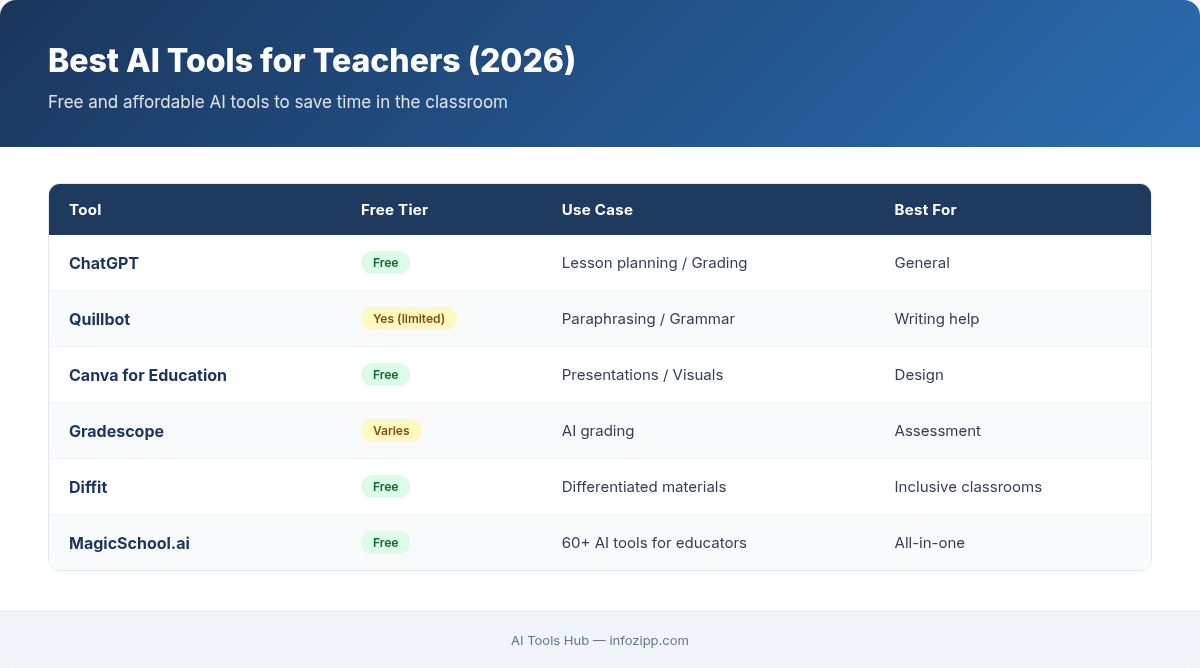
These aren’t generic chatbots repurposed for the classroom. The best AI tools for teachers in 2026 understand curriculum standards, grade-level expectations, and the real workflows that eat up your evenings and weekends. Below, we break down 12 apps that deliver genuine time savings — with practical examples, honest pricing info, and tips on how to get started.
1. MagicSchool AI — The All-in-One Teacher’s Assistant
If you only try one tool from this list, make it MagicSchool AI. Purpose-built for educators, it offers over 60 AI-powered generators covering lesson plans, rubrics, IEP goals, accommodation suggestions, newsletter drafts, and more.
How it saves time: Instead of spending 45 minutes crafting a standards-aligned lesson plan from scratch, you enter the topic, grade level, and standard — and MagicSchool generates a complete plan in under a minute. You then refine it to match your teaching style.
Practical example: A 7th-grade science teacher needs a 5E lesson plan on plate tectonics aligned to NGSS MS-ESS2-2. MagicSchool generates a full plan with engage, explore, explain, elaborate, and evaluate sections — including suggested discussion questions and a formative assessment.
- Best for: Lesson planning, rubric creation, IEP writing, parent communication
- Pricing: Free tier with limited generations; MagicSchool Plus at $9.99/month for unlimited access; school/district plans available
- Standout feature: The “Raina” student-facing AI tutor that gives guided help without handing out answers
2. Brisk Teaching — AI That Lives Inside Your Browser
Brisk Teaching takes a different approach: it’s a Chrome extension that works directly inside Google Docs, Slides, YouTube, and other tools teachers already use. No new platform to learn.
How it saves time: Highlight a passage in Google Docs and Brisk can instantly adjust the reading level, translate it, or generate comprehension questions. Open a YouTube video and it creates a viewing guide with timestamps and discussion prompts.
Practical example: You’re assigning a New York Times article to your 10th-grade English class, but three students read at a 6th-grade level. With Brisk, you highlight the article, click “Change Reading Level,” and get a simplified version that preserves the key ideas — in about 10 seconds.
- Best for: Differentiation, feedback on student writing, creating resources from existing content
- Pricing: Free for individual teachers; premium features for schools at custom pricing
- Standout feature: “Give Feedback” tool that provides personalized, constructive comments on student writing inside Google Docs
3. Diffit — Differentiation Made Effortless
Differentiation is one of teaching’s biggest time sinks. Diffit (short for “differentiated fit”) uses AI to adapt any resource — articles, videos, topics — to multiple reading levels and languages.
How it saves time: Instead of manually rewriting a text at three different Lexile levels, paste a URL or topic into Diffit and it generates leveled versions with built-in vocabulary support, comprehension questions, and a summary.
Practical example: A 5th-grade social studies teacher is teaching about the American Revolution. She enters the topic, selects grade levels 3, 5, and 8, and Diffit produces three versions of an informational text — each with appropriate vocabulary highlights and questions. Total time: about 2 minutes versus the 45 minutes it would take to do manually.
- Best for: ELL support, multi-level classrooms, reading comprehension activities
- Pricing: Free tier available; Diffit Pro at $5.99/month for unlimited resources
- Standout feature: Automatic vocabulary identification and definitions matched to each reading level
4. ChatGPT — The Swiss Army Knife for Rubrics, Plans, and Ideas
You probably already know ChatGPT, but most teachers underuse it. With the right prompts, it becomes an incredibly powerful curriculum design partner — especially the free version with GPT-4o.
How it saves time: ChatGPT excels at generating rubrics, writing sample responses at different proficiency levels, brainstorming project ideas, creating word problems, and drafting parent emails. The key is giving it specific context: grade level, standards, student needs, and your expectations.
Practical example: Prompt: “Create a 4-point analytical rubric for an 8th-grade persuasive essay. Categories: thesis/claim, evidence, organization, conventions. Each level should have specific, observable criteria — not vague language like ‘excellent’ or ‘needs improvement.’” You get a usable rubric in 30 seconds that would normally take 20 minutes to write.
For a deeper dive into making ChatGPT work for professional tasks, check out our guide on how to use ChatGPT for work with 20 practical prompts.
- Best for: Rubric creation, brainstorming, drafting communications, generating practice problems
- Pricing: Free (GPT-4o with limits); ChatGPT Plus at $20/month for higher limits and advanced features
- Standout feature: Custom GPTs — you can build a specialized assistant trained on your curriculum (see our Custom GPT tutorial)
5. Canva for Education — Design-Quality Materials Without the Design Skills
Canva for Education is free for all K-12 teachers and includes premium features that normally cost $120/year — plus AI-powered tools like Magic Write, text-to-image generation, and presentation-to-lesson conversion.
How it saves time: Instead of fighting with clip art in PowerPoint, use Canva’s thousands of education-specific templates for worksheets, infographics, slide decks, posters, and flashcards. The AI features let you generate images for specific topics, rewrite text at different levels, and auto-format entire presentations.
Practical example: A biology teacher needs a visually engaging worksheet on cell organelles. She selects a worksheet template, uses Magic Write to generate descriptions of each organelle, adds AI-generated diagrams, and exports a print-ready PDF — all in about 10 minutes.
Curious how Canva’s AI features stack up against other design tools? We compared them in detail in our Canva AI vs Adobe Firefly comparison.
- Best for: Worksheets, presentations, posters, infographics, social media for school events
- Pricing: 100% free for verified K-12 educators (includes premium features)
- Standout feature: Bulk Create — generate 30 personalized certificates or flashcards from a spreadsheet in one click
6. Gradescope — AI-Assisted Grading That Actually Works
Gradescope (by Turnitin) uses AI to dramatically speed up grading for both paper-based and digital assignments. It’s particularly powerful for STEM subjects where students show work.
How it saves time: Upload scanned student work, and Gradescope’s AI groups similar answers together. Grade one response in a group, and the rubric applies to all similar responses automatically. For a class of 150, this can reduce grading time from 8 hours to 2.
Practical example: A high school calculus teacher uploads 120 scanned quizzes. Gradescope identifies that 45 students made the same algebra error in problem 3, groups them, and lets the teacher apply feedback to all 45 at once. Each student still gets their individual graded paper back with specific point deductions.
- Best for: STEM grading, large class sizes, consistent rubric application
- Pricing: Free basic tier for individual instructors; institutional licenses for advanced AI features
- Standout feature: AI-assisted answer grouping that learns your rubric as you grade
7. Curipod — Interactive Lessons with AI-Generated Slides
Curipod generates entire interactive lesson presentations from a single topic input. Think Nearpod meets AI — it creates slides with embedded polls, open-ended questions, word clouds, and drawing activities.
How it saves time: Enter a topic and grade level, and Curipod produces a ready-to-present interactive lesson in about 60 seconds. Students participate on their devices, and you get real-time data on understanding.
Practical example: A 6th-grade teacher types “introduction to fractions” and gets a 15-slide interactive lesson with a warm-up poll, visual explanations, three practice problems with live feedback, a reflection question, and an exit ticket. She tweaks two slides and it’s ready to teach.
- Best for: Interactive presentations, formative assessment, student engagement
- Pricing: Free tier with 5 lessons/month; Pro at $7.50/month for unlimited lessons
- Standout feature: AI feedback on student open-ended responses, saving teachers from reading 30 individual answers
8. SchoolAI — Personalized AI Tutors for Your Students
SchoolAI lets teachers create custom AI tutoring “Spaces” where students interact with an AI tutor that follows your specific rules and curriculum. The teacher dashboard shows every conversation in real time.
How it saves time: Instead of running between 30 raised hands during independent practice, set up a SchoolAI Space that guides students through problems step-by-step — without giving away answers. You monitor the dashboard and intervene only where the AI flags a student is stuck.
Practical example: During a writing workshop, a teacher creates a Space called “Thesis Statement Coach.” Students paste their draft thesis and the AI asks guiding questions: “What’s the main argument? What evidence will you use? Can you make this more specific?” The teacher sees every interaction and can jump into any conversation.
- Best for: Personalized tutoring, independent practice, writing workshops
- Pricing: Free for up to 35 students; Pro plans for schools starting at $4/student/year
- Standout feature: Real-time teacher dashboard showing all student-AI interactions with flagging for students who need help
9. Almanack — Curriculum-Aligned Lesson Planning on Autopilot
Almanack focuses exclusively on lesson planning and resource generation, but it goes deeper than most tools by connecting directly to curriculum standards from multiple countries and states.
How it saves time: Select your standard, and Almanack generates a complete lesson plan with learning objectives, activities, assessments, and differentiation suggestions — all explicitly tied to the standard’s language. It also generates accompanying worksheets and slide decks.
Practical example: A 4th-grade teacher selects Common Core Math 4.NF.A.1 (equivalent fractions). Almanack generates a 50-minute lesson plan with a hands-on fraction strip activity, guided practice problems, an independent worksheet (auto-generated), and a 5-question exit ticket — all aligned and ready to use.
- Best for: Standards-aligned planning, new teachers who need structured frameworks
- Pricing: Free tier with limited features; Premium at $11.99/month
- Standout feature: Direct integration with national and state standards databases
10. Quillbot and Goblin Tools — Accessibility and Simplification
Quillbot is primarily known as a paraphrasing tool, but teachers use it to simplify complex texts for struggling readers and ELL students. Goblin Tools, meanwhile, uses AI to break complex tasks into manageable steps — invaluable for students with executive function challenges.
How they save time: Instead of manually rewriting instructions or breaking down multi-step projects, these tools handle it in seconds. Quillbot’s “Simple” mode rewrites academic text at a lower reading level. Goblin Tools’ “Magic To-Do” turns a vague assignment like “Write a research paper” into 12 specific, sequenced steps.
Practical example: A special education teacher pastes a 10th-grade history passage into Quillbot’s Simple mode and gets a version her students with learning disabilities can access independently. Then she uses Goblin Tools to break the accompanying assignment into explicit steps for students who need executive function support.
- Best for: Accessibility, ELL support, executive function scaffolding, IEP accommodations
- Pricing: Quillbot: Free tier; Premium at $4.17/month. Goblin Tools: Free
- Standout feature: Goblin Tools’ “Formalizer” and “Judge” tools for helping students self-edit their tone and clarity
11. Twee — AI Content Generation for Language Teachers
Twee is built specifically for ESL/EFL and world language teachers. It generates dialogues, vocabulary exercises, fill-in-the-blank activities, discussion questions, and reading comprehension passages for any topic and proficiency level.
How it saves time: Creating level-appropriate content for language classes is notoriously time-consuming. Twee generates an entire lesson’s worth of practice materials — from a warm-up dialogue to a vocabulary matching exercise to a cloze passage — in about a minute.
Practical example: A Spanish teacher needs B1-level materials about environmental sustainability. Twee generates a dialogue between two students discussing recycling, a vocabulary list with contextual definitions, five comprehension questions, and a fill-in-the-blank exercise — all at the appropriate CEFR level.
- Best for: ESL/EFL teachers, world language classes, proficiency-leveled materials
- Pricing: Free tier with limited generations; Pro at $4.99/month
- Standout feature: CEFR-level content generation that accurately matches proficiency standards
12. Otter.ai — Meeting and Lecture Notes on Autopilot
Otter.ai isn’t teacher-specific, but it solves a problem every educator faces: documentation. Use it to transcribe parent conferences, team meetings, IEP discussions, or even your own lectures for students who were absent.
How it saves time: Instead of taking frantic notes during a 45-minute IEP meeting while trying to actively participate, let Otter record and transcribe the conversation. After the meeting, you get a searchable transcript with AI-generated action items and a summary.
Practical example: During a parent-teacher conference, Otter transcribes the entire 20-minute conversation. Afterward, the teacher reviews the AI summary, confirms the action items (“Parent will establish a homework routine; Teacher will send weekly progress updates”), and emails the summary to the parent — all in 3 minutes instead of rewriting notes from memory.
- Best for: Meeting documentation, lecture capture, IEP meeting records, professional development notes
- Pricing: Free tier with 300 minutes/month; Pro at $8.33/month for 1200 minutes
- Standout feature: AI-generated action items that pull specific to-dos from meeting conversations
How to Get Started Without Getting Overwhelmed
Twelve tools is a lot. Here’s a practical approach to adopting AI in your teaching workflow without burning out:
Week 1: Pick one pain point. Is it lesson planning? Grading? Differentiation? Parent communication? Choose the tool from this list that addresses your biggest time drain.
Week 2: Use it for one class or one subject. Don’t try to overhaul everything at once. Use MagicSchool to plan just your Monday lessons, or Brisk to differentiate materials for just one unit.
Week 3: Evaluate honestly. Did it actually save time? Was the output quality good enough, or did you spend just as long editing? If it worked, expand. If not, try a different tool.
Week 4: Add a second tool. Once one tool feels natural, layer in another. Most teachers at AI Tools Hub report that the combination of a planning tool (MagicSchool or Almanack) plus a differentiation tool (Diffit or Brisk) delivers the biggest time savings.
Pro tip: Start with the free tiers. Every tool on this list has a free option that’s genuinely useful — not just a teaser. You can build a complete AI-assisted workflow without spending a dollar.
If you want to explore even more no-cost options, our roundup of the 15 best free AI tools in 2026 covers additional picks across categories.
The Bottom Line
AI won’t replace teachers — that’s not the point. But it can replace the hours of administrative and prep work that keep teachers at their desks until 7 PM. The tools listed above are specifically designed for education contexts, which means they understand standards alignment, age-appropriate content, and the reality of managing a classroom of diverse learners.
The teachers seeing the biggest impact aren’t using AI to do their jobs for them. They’re using it to reclaim the time that was never about teaching in the first place — so they can spend more energy on what they actually became teachers to do: connect with students and help them learn.
Start with one tool, solve one problem, and build from there. Your Sunday evenings will thank you.

Alex Kim is an AI tools reviewer and tech writer with over 5 years of experience evaluating SaaS and AI products. He specializes in hands-on comparisons of AI writing assistants, coding tools, and productivity software — testing each tool through real-world workflows before publishing any recommendation. His mission at AI Tools Hub is to help readers cut through the hype and find AI tools that actually deliver results.